
Many people are looking for DEX exchanges these days. While exchanges like Binance and OKX also operate a DEX, they currently only offer meme coin-based spot trading, and futures trading is not properly prepared.
For this reason, Aster is one of the most sought-after DEX exchanges in Korea. Let's look at the usage, advantages, and 8 reasons to use the Aster exchange.
What is Aster DEX Exchange?
The Aster exchange excels particularly in areas such as multi-chain support, high leverage, advanced features, and asset control. It is recommended for traders who do not have a large capital and wish to aim for a jackpot with a small amount, or for those who want to employ various trading strategies.
Furthermore, you can trade famous US stocks in futures trading with a maximum leverage of up to 25x.
Naturally, as it is a DEX exchange, it possesses all the advantages of a decentralized exchange.
8 Reasons to Use Aster DEX (Advantages)
Then, I will explain the 8 practical advantages unique to the Aster exchange.
Stability as the 2nd Ranked DEX for Spot and Futures
Firstly, the Aster exchange is currently (as of 25.10.31) the 2nd ranked DEX exchange based on CoinMarketCap.
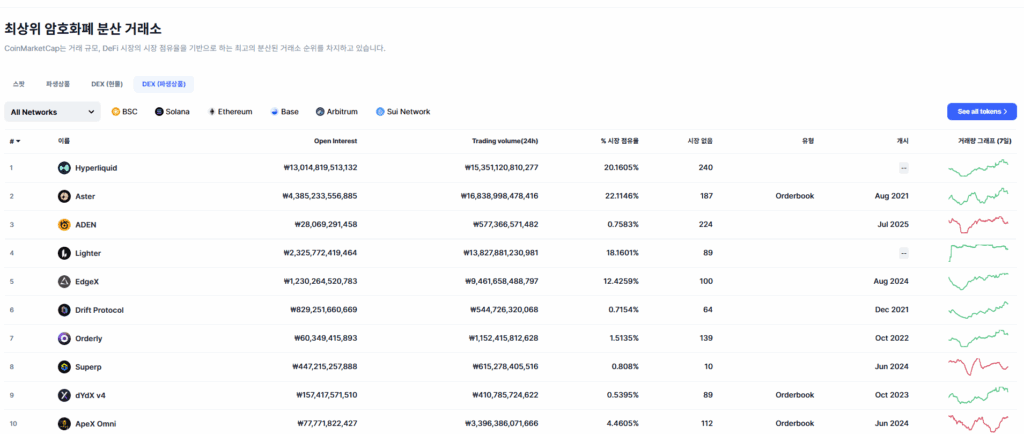
For DEX spot trading, PancakeSwap is number 1, and for futures, Hyperliquid is number 1. However, Aster is currently ranked 2nd in both categories.
Furthermore, its market share and trading volume are higher than Hyperliquid. It is also one of the exchanges that started early among DEX exchanges.
No KYC Required, Trading Possible with Only a Wallet
As Aster is a DEX exchange, identity verification is not required. Membership registration is also very simple (if you already have a supported wallet, registration is not even necessary), and there's no need for identity verification. You will be surprised when I show you how to connect your wallet below.
100x Futures Trading Leverage
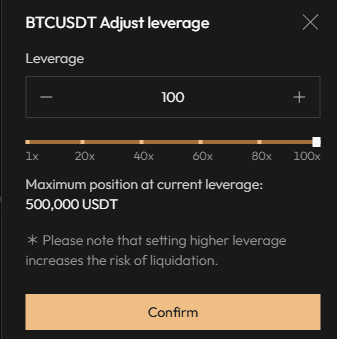
Aster provides 100x leverage for Bitcoin, Ethereum, and Solana. Although Binance supports 150x for Bitcoin, this is an advantage because Hyperliquid only supports up to 40x, even for Bitcoin.
Unique 1001x System (But Not Recommended)
Aster has a new futures trading system called 1001x.
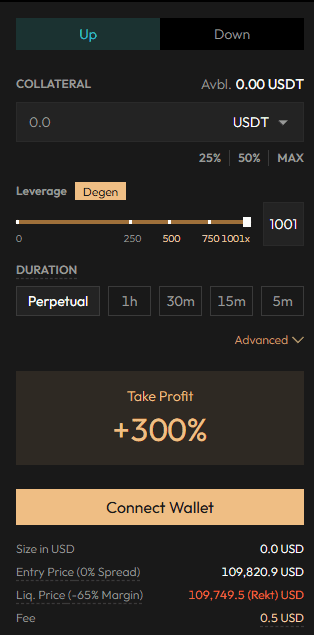
As the name suggests, leverage is possible up to 1001x. It allows for custom time settings, so it can take a form similar to futures/options with an expiration date, or you can simply hold the position.
Through this, you can achieve very high profits (up to 500%) and make a profit with 'very little' capital.
If you only look at it this way, it seems very reasonable, but there's a catch hidden. Those who wish to attempt 1001x should check the article below before trying.
Support for Multi-Asset Mode and Hedge Mode / Setup Method
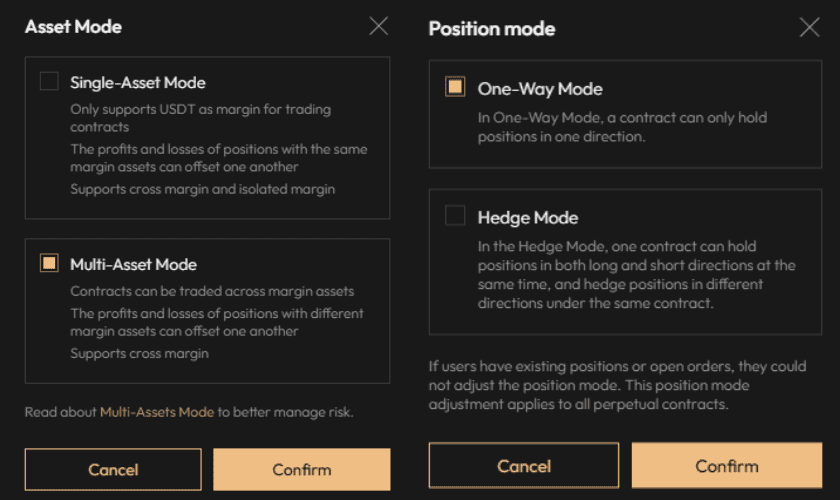
Generally, unless it is a large-scale exchange, not many exchanges support modes like Multi-Asset Modeor Hedge Mode.를 지원하는 거래소는 많지 않습니다.
The fact that it supports Multi-Asset Mode and Hedge Mode means that high-level traders are already using it extensively and have demanded these systems.
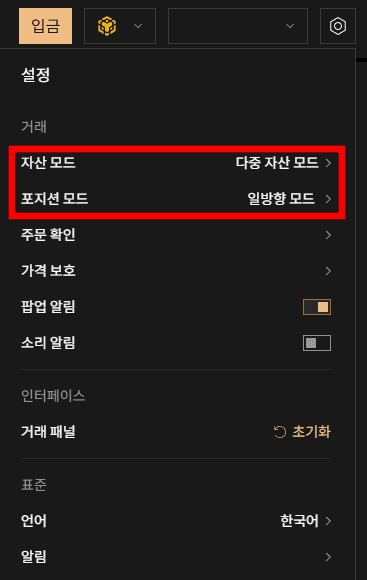
You can set it up immediately by clicking the settings in the upper right corner.
US Stock Trading in Futures, Foreign Exchange Trading in 1001x
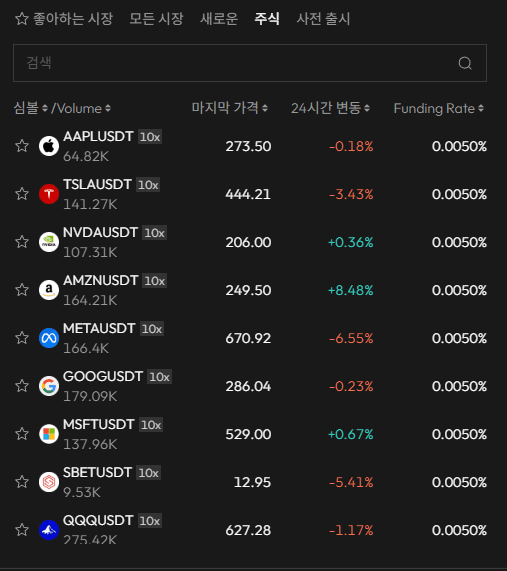
US stock trading was also possible on Bitget, but ETF futures trading was not. This means trading of ETFs like QQQ is possible, allowing for stock index trading, and individual stock trading is also possible.
There were also those who wanted foreign exchange trading on a coin exchange.
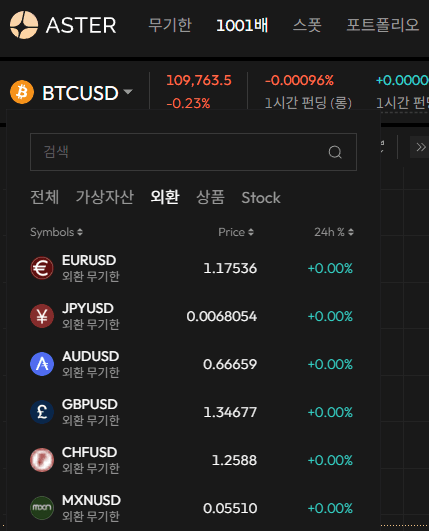
If you look at the 1001x, foreign exchange trading is possible. The original ultra-high leverage trading method came from FX foreign exchange trading. Those interested in foreign exchange or US stock futures trading may find it helpful to trade by taking advantage of the fact that it is not taxable as coin trading until 2027 in Korea.
Korean Language Support / Setup Method
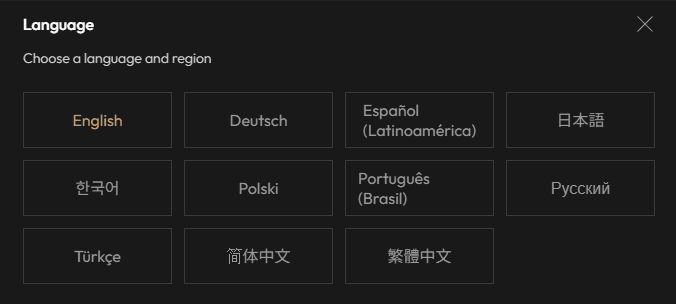
Most exchanges do not support Korean, but the Aster exchange does.
Since the phrases and menu settings were likely not written by a native Korean speaker, there may be awkward parts, but it is at a level that does not cause inconvenience in use.
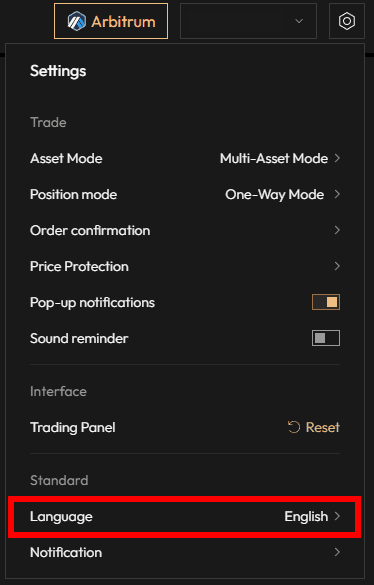
Click the settings button in the upper right corner, and 'Language' is below. Clicking it will bring up the screen you saw above, where you can change the setting to Korean.
Very Low Fee Rate and VIP Fee Discount
Aster is very unique in that the base fee for the number 1 competitor, Hyperliquid, is 0.01% for Maker (Limit) and 0.035% for Taker (Market), with a low limit fee and a high market fee.
- For Aster spot, the fees are 0.005% for Limit and 0.04% for Market.
- For futures, the fees are 0.005% for Limit and 0.04% for Market.
- For 1001x, it is 0.08% for less than 500x, and for 500x or more, there is no opening fee, and a proportional fee based on the profit rate is incurred. The minimum fee is 0.03%, and there is no set maximum fee.
Please refer to the article below for the detailed fee rate calculation method and VIP fee discount benefits of Aster DEX.
Aster Wallet Connection Method (Binance Wallet) and 10% Discount
You can receive a $10\%$ trading fee discount by entering Aster through the link below.
** Note that I do not gain any profit if you sign up through the link below.
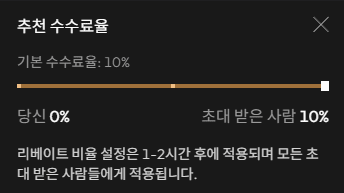
If you follow the link above, a screen like the one below will appear.
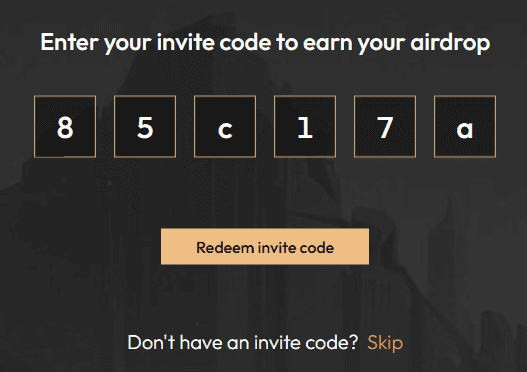
Click 'Redeem invite code'.
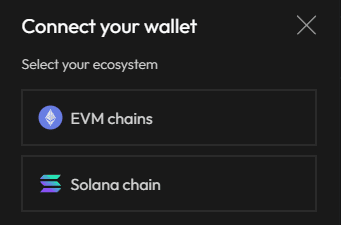
You must choose the chain you will use. It does not matter which one you choose. However, you must have a wallet that you use. Also, if you log in with an email, you cannot use professional features such as 1001x and Rocket Launch.
It is best to use a self-custodial personal wallet like Binance Wallet. Please refer to the article on how to create a Binance Wallet .
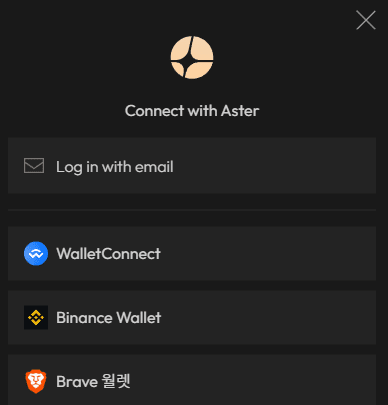
I will use Binance Wallet since I have one.
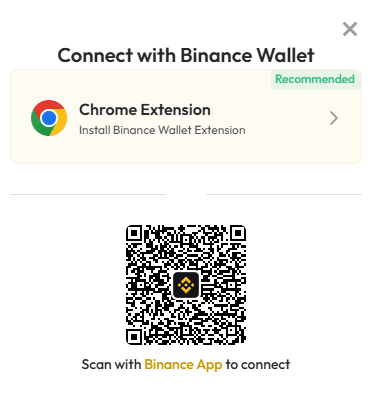
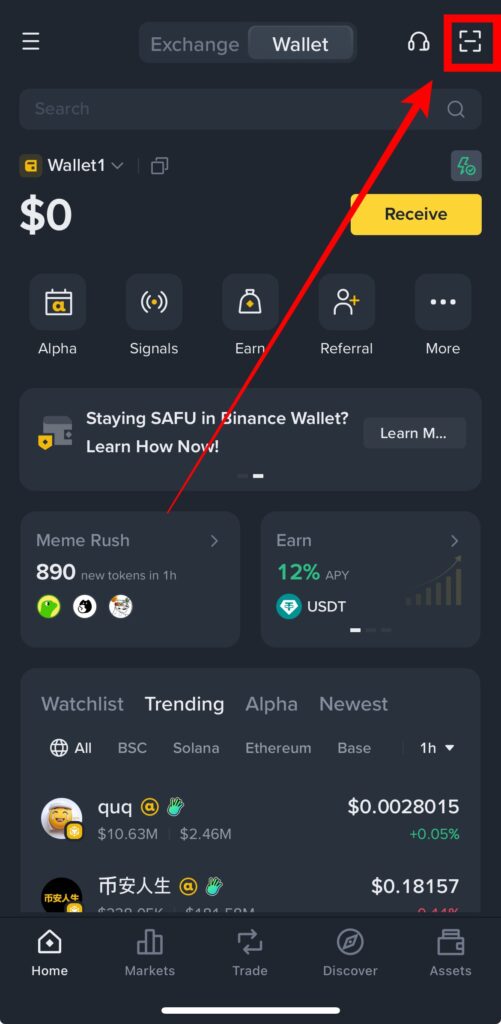
When a screen like the one above appears, scan it with the Binance App. In the wallet page, there is a scan function in the upper right corner, and in the Binance exchange page, you can find the scan function in the upper right after pressing 'More' in the upper left.
After scanning, a screen like the one below appears on Aster.
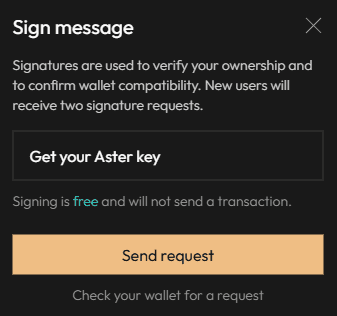
Clicking 'Send request' prompts a question in the Binance App asking if you want to authenticate the wallet.
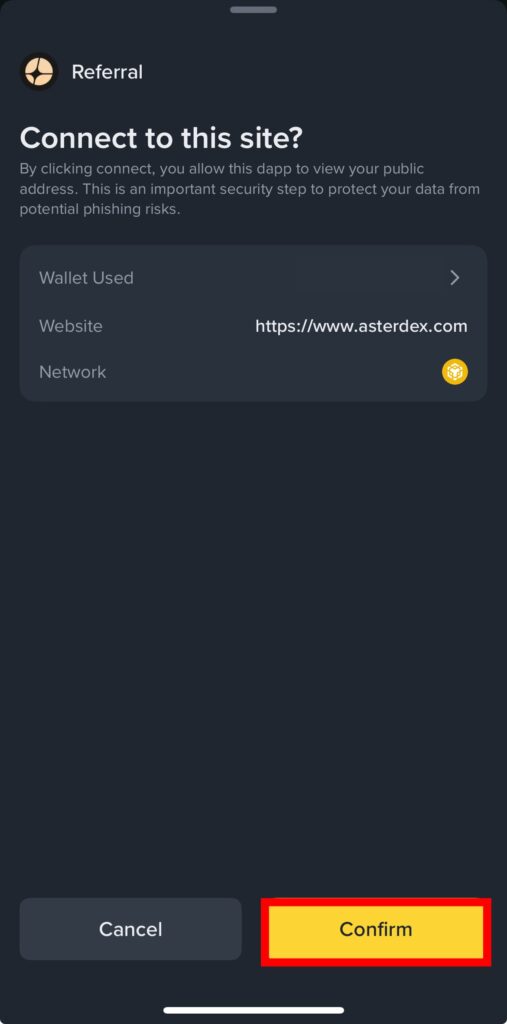
Click 'Confirm'.
After this, it asks if you want to use the referral code, as shown below.
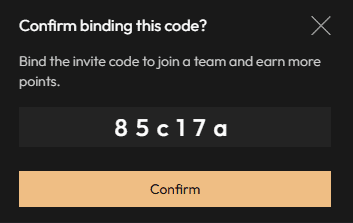
If the code is the same as the one above, 85c17aplease click 'Confirm'.
If you have proceeded this far, the $10\%$ trading fee discount has been applied.
Aster Network Change Method
If you change the chain from BSC to Arbitrum One, Solana, or Ethereum, a screen like the one below will also be displayed. This is for setting the wallet connection network, and when connecting your wallet to Aster, you can use the desired network by setting the network first and then connecting.
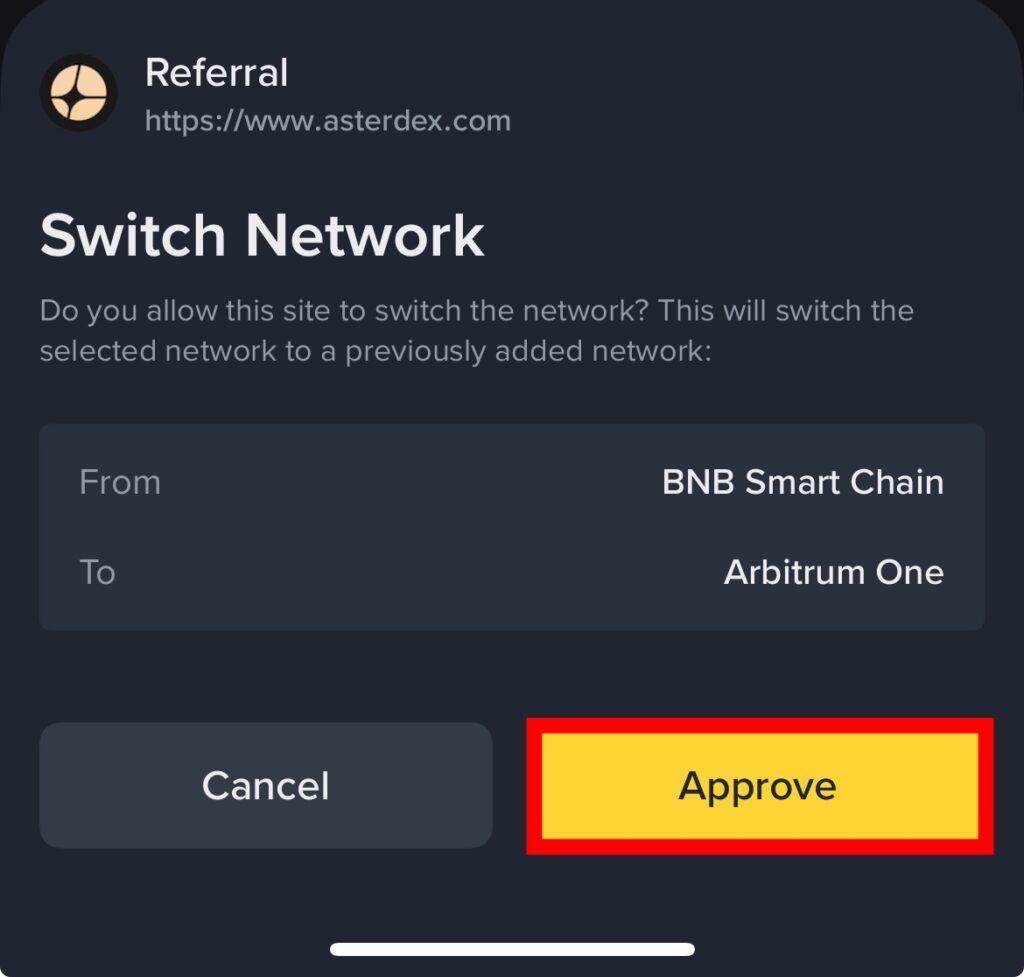
Please don't be alarmed if you forget this connection method and your BSC network funds are not displayed on Arb.
Clicking 'Approve' completes the network switching.
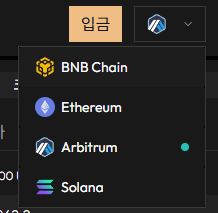
Note that after the wallet connection is complete, you cannot change the network within Aster. When you click the network you want to switch to on Aster, a notification will pop up on your personal wallet app (like Binance Wallet) asking if you want to switch networks, as shown above. Clicking 'Approve' allows you to change it.
Aster Deposit Method (Arbitrum One)
If you plan to trade 1001x, you can use it without depositing to the Aster exchange. You can use the funds in your personal wallet after getting approval.
Click 'Deposit' in the upper right corner.

If you have connected your personal wallet to Aster, you must first transfer funds to that wallet and then move them to Aster. Note that if the network of the wallet you hold and the network connected to Aster are different, it may show that you have insufficient funds.
The coins currently supported for deposit to Aster via the Arbitrum network are four: ETH / USDC.e / USDT / USDC.
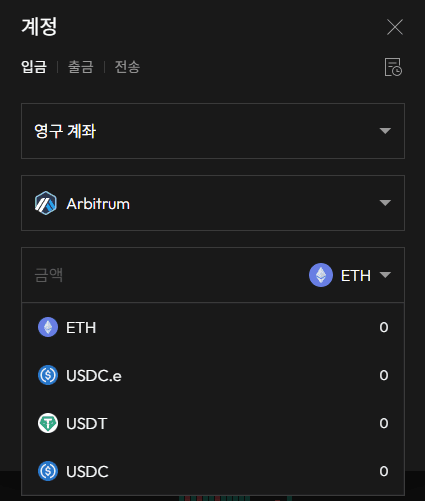
When you select the coin you wish to deposit, a screen like the one below appears.
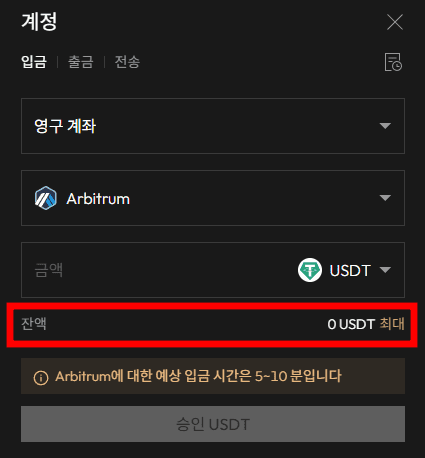
The red area indicates how much you have in the Arbitrum network within your personal wallet (like Binance Wallet).
Clicking 'Approve USDT' above sends a notification to your personal wallet asking if you approve the transaction. So, don't just wait after clicking the approve button; please check the wallet you connected, such as Binance Wallet.
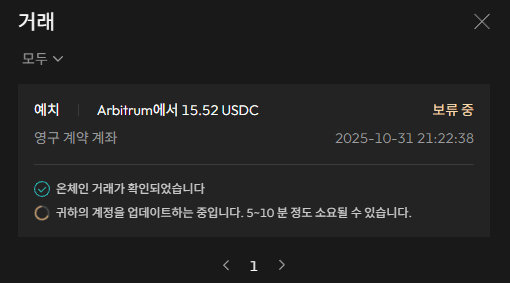
The transfer details should appear as in the image above.
Note that 1001x has an execution fee, which is a fixed fee of 0.5$ for BSC and 0.2$ for Arb.
Exchanges Supporting Arbitrum One Network Deposit
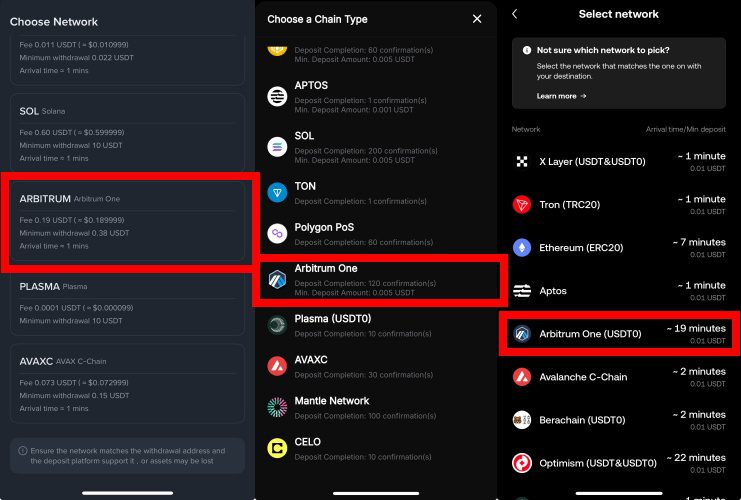
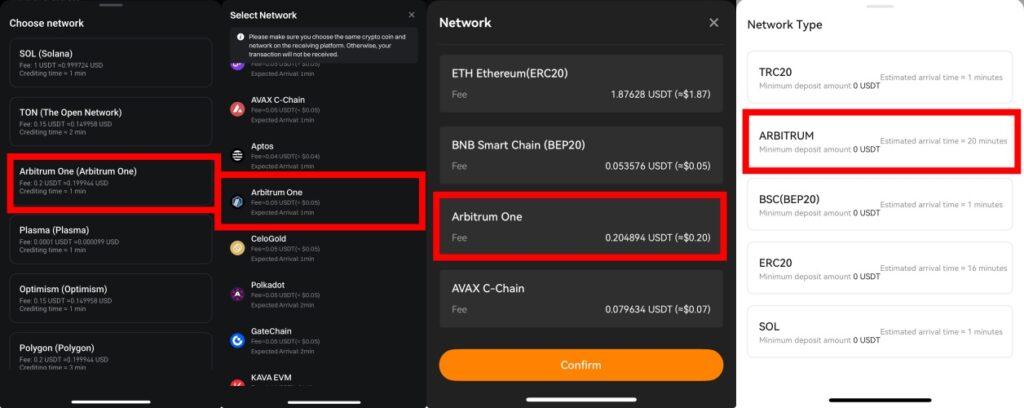
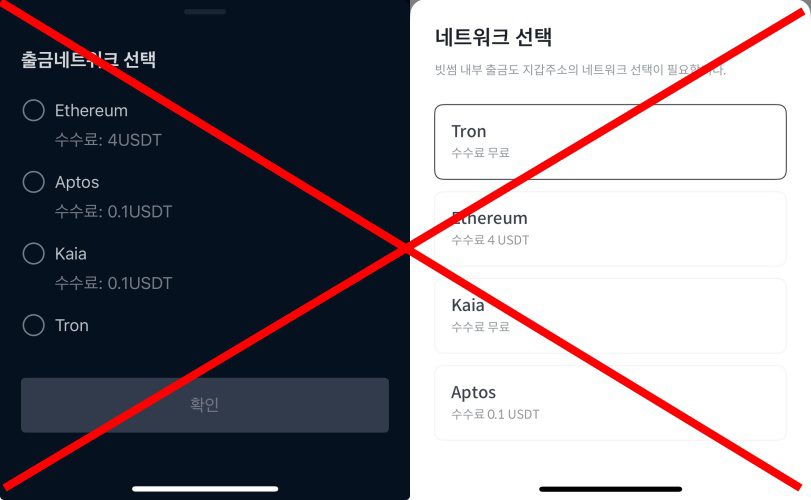
In the first place, deposits over 1,000,000 KRW from Upbit and Bithumb to Binance Wallet are not possible. If you have funds in a domestic exchange like Upbit or Bithumb, you must transfer them to an overseas exchange first and then to your personal wallet
Otherwise, you may experience significant stress due to fund return documentation.
Aster Spot and Futures Trading Methods
Please refer to the article below for spot and futures trading methods on Aster. Usually, trading is possible immediately after depositing. You just need to check whether the funds are in the spot wallet or the futures wallet.
Aster 1001x Trading Method (and Disadvantages)
To use 1001x, you must first approve the coin you will trade in your wallet. Since gas fees are incurred per network and coin, you only need to approve one or two coins you plan to trade.
Approving Trading Pair Coins
BSC
The tradable collateral on BSC is as follows. As it is listed as Collateral, you do not need to deposit to the Aster exchange; you only need to pay the gas fee to approve the collateral coin for trading.
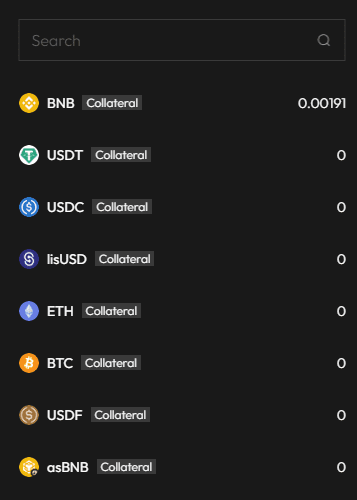
Since all commonly used trading pairs are here, I would generally recommend BSC.
Arbitrum
First, the usable coins based on the Arbitrum network wallet are as follows.
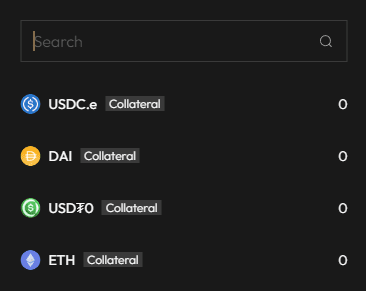
It seems only ETH is available as a general coin. Since it can be confusing for those who didn't originally trade with BTC/ETH, I recommend USDC.e.
Clicking USDC.e brings up the screen like this.
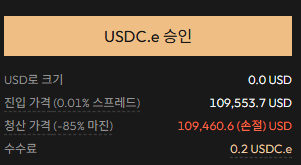
Click 'Approve USDC.e'. Then an alarm goes to your personal wallet.
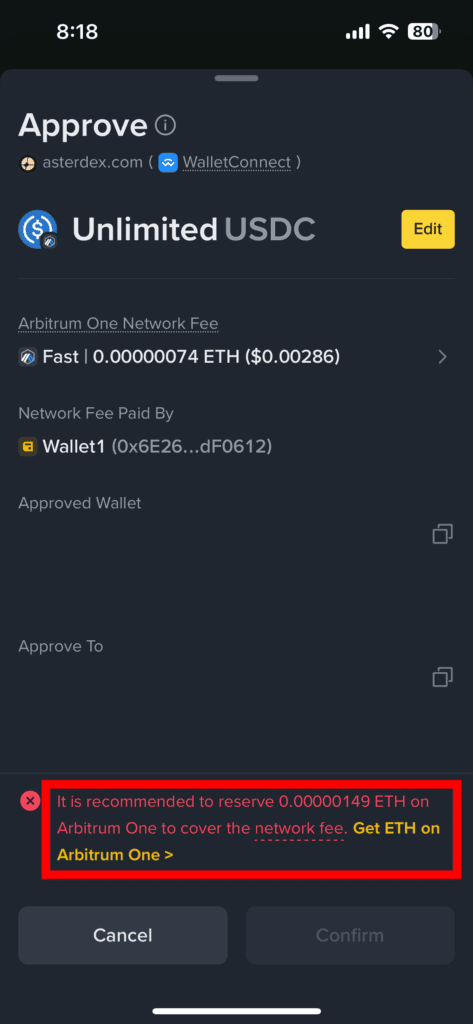
A small amount of ETH gas fee is required.
You can use it after paying the gas fee with ETH and clicking 'Confirm'.
Trading 1001x
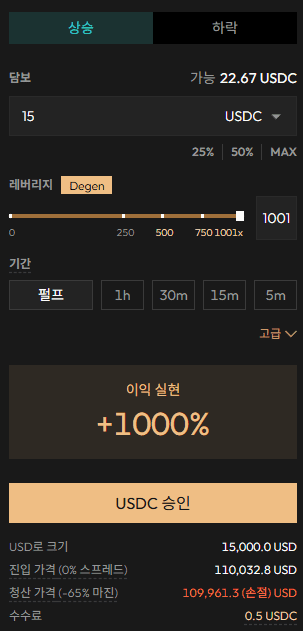
If you put funds into your wallet (in my case, Binance Wallet) and switch it to the corresponding collateral, trading becomes possible.
The fee changes depending on the leverage rate. Below 500x, it is a fixed leverage of 0.08%. From 500x or more, it starts with a 0.03% fee upon liquidation and becomes a variable fee based on the profit rate.
You can set a time limit for trading, or 'Pulp' (Perpetual) lasts indefinitely until liquidation.
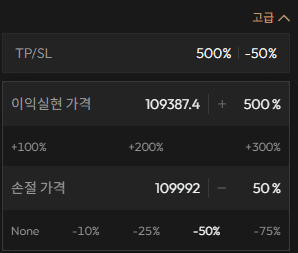
However, the maximum profit rate is limited to $500\%$. It is automatically liquidated when it reaches $500\%$. The price range is calculated based on the current price, leverage, and profit rate, so you don't need to calculate it separately.
Also, you must click the 'Approve' button on your wallet (like Binance Wallet) every time you open or close a trade.

Disadvantages of Aster 1001x, Review Based on Direct Experience
Honestly, based on experience, there are only disadvantages.
Order Speed is Catastrophically Slow
This alone is so fatal that trading is impossible.
The order process seems to go through [Aster approval request – Personal wallet approval – Aster order – Network connection – Order success]. In a situation where you are using 100x, 200x, 500x, or 1000x leverage, not just 1x or 2x, this process often takes 5 seconds, or even over 30 seconds.
The time from initiating the order to execution takes over 5 seconds, and slippage occurs, but since it's not a limit order, only market execution is possible.
Even if you set a stop-loss line and try to close the position at market price, you end up waiting for approval from the wallet and for the order to be fulfilled, which often leads to a -100% liquidation.
The order was placed, but they made me wait 15 seconds for a network connection, and then it was liquidated. High-leverage trading relies on ultra-fast order execution, so this absurd order speed completely defeats the purpose of using high leverage.
The Trap of a Maximum Profit Rate of 500% (5x)
Even if the order speed were slow, if there was a chance for a jackpot in one go, you could at least have expectations similar to zero-day options.
With a 10 dollar, 1000x leverage, the position is 10,000 dollars. For example, if you are lucky enough to catch a 1% vertical pump in Bitcoin, it would be magnified 10 times.
If this were also applied to 100, 500, or 1000 dollars, you might get a 10,000% profit in one go if you were lucky, like a zero-day option. Then it would truly be useful.
However, the maximum profit rate is limited to 500%, and from that, 75% of the margin is taken as a fee. Who buys an option with a capped upside?
Capping the upside while taking fees based on the profit rate is a very serious problem.
Effective Fee is Too High
Below 500x, a 0.08% round-trip fee plus a fixed network fee of 0.5$ or 0.2$ is added.
Above 500x, a 0.03% or profit-rate-based one-way fee (upon liquidation) plus a fixed fee of 0.5 or 0.2 is added.
Let's do a simple calculation.
The futures trading fees for general CEX exchanges are 0.02%/0.04%. Aster DEX's futures trading fees are 0.005%/0.035%.
Even below 500x, a 0.08% fee means Leverage times 0.08, excluding the fixed fee. For 500x or more, it means it starts at a minimum of $500 times 0.03.
Calculating this based on the margin, one-way is 8% for 100x, 16% for 200x, 24% for 300x, and 32% for 400x. Since it's round-trip, you must multiply by 2.
From 500x, 500x is 15%, 700x is 21%, and 1000x is 30%. If you make a profit, the fee is taken based on the profit amount.
You can understand this by looking at the picture below.
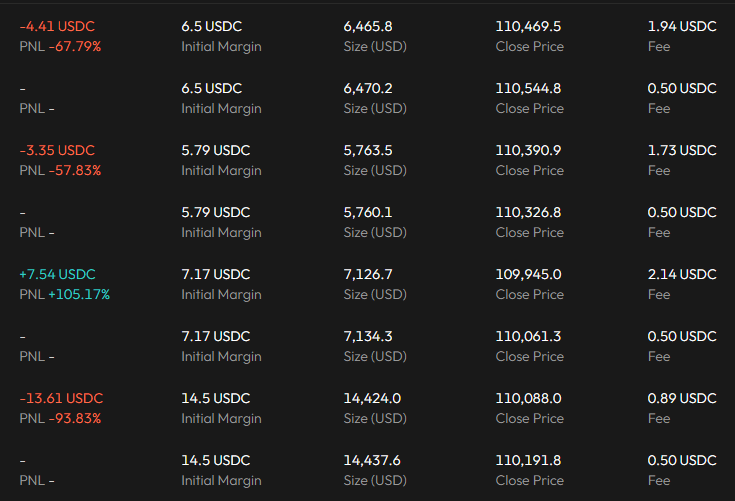
With a margin of 6.5 dollars and 1000x leverage, the liquidation fee is 1.94 dollars. That is 30%.
With a margin of 7 dollars and 1000x leverage, a 100% profit is made, and the liquidation fee is 2.14 dollars. That is approximately 30%.
If you do this frequently, an enormous amount of trading fees will be incurred, and your principal will melt away.
Referral Discount is Not Even Applied
Although this can be understood as it is a specialized derivative product, they impose an outrageous fee rate, the order speed is ridiculous, it is not counted towards trading volume, and they do not apply any referral discount.
Chart Keeps Resetting
The chart keeps resetting, and due to slow server speed, the chart lags and freezes even when viewing the 1-minute candle. It is not an environment conducive to normal trading.
It literally embodies the former name of 1001x: 'Dumb Mode.' The intention that 'those who do this are fools' is adequately captured.
Do not do 1001x.
If you are told not to, just don't do it.
You might put in 10 or 20 dollars just for fun, but as you do it, you'll realize there's no reason to use this sluggish trading method instead of just doing 100x futures.
Trading with this method is not counted towards the trading volume, so you cannot even receive Aster VIP benefits.
Aster Withdrawal Method
Withdrawal, like deposit, is done by clicking 'Deposit' in the upper right corner, and then clicking 'Withdrawal' on the screen that appears. The withdrawal here is in the form of withdrawing to your personal wallet, just like a deposit.
In other words, you withdraw the amount you hold within Aster to your personal wallet. The withdrawal fee is $0.51$ in USDT.
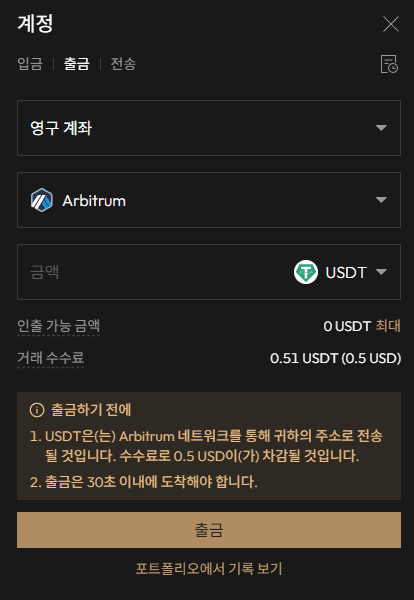
Enter the amount you wish to withdraw and click 'Withdrawal'.
Aster DEX App Download
- Android Aster DEX Download
- iPhone Aster DEX Download(Not available in Korea)
Aster DEX Usage Guide
We have gathered all the previously compiled exchange usage guides and Q&A into a roadmap for easy viewing. Please bookmark and use it.
[Check Crypto Exchange Usage Guide]