
Many people are curious about the Binance Multi-Asset Mode. In this article, we will find out what Binance Multi-Asset Mode is and how to use it.
What is Binance Multi-Asset Mode?
멀티에셋모드는 한국말로 다중자산모드라고 하는데요.
Multi-Asset Mode is a feature on Binance Futures that allows multiple assets (e.g., USDT, USDC, BTC, ETH, etc.) to be used as common margin (collateral). 으로 사용하는 기능입니다.
In other words, the profit from one asset can offset the loss from another asset, so the maintenance margin is calculated based on the Net PnL (Profit and Loss) of the entire account.
Single-Asset Mode VS Multi-Asset Mode
| Category | Single-Asset Mode | Multi-Assets Mode |
|---|---|---|
| Margin Asset Usage | Only the single asset of the respective pair is used (e.g., BTCUSDT $\to$ only USDT is used) | Multiple assets can be used as margin (e.g., USDT, USDC, BNB, etc.) |
| PnL (Profit/Loss) Offset | Possible only within the same asset | Possible to offset PnL between different assets |
| Margin Mode | Supports both Cross + Isolated | Supports only Cross Margin |
| Risk Structure | Simple, beginner-friendly | Complex, for advanced traders |
| Example | BTCUSDT profit is displayed only in USDT | BTCUSDT profit is reflected by offsetting PnL between USDT and USDC |
Collateral Value Ratio for Multi-Asset Mode
Binance applies different collateral value ratios in Multi-Asset Mode depending on your VIP level.
| Asset (Margin Asset) | Collateral Value Ratio | Max Transfer Limit (General User) | Max Transfer Limit (VIP 1 User) | Description |
|---|---|---|---|---|
| BTC | 95.00% | 10 BTC | 40 BTC | BTC can be used as collateral, 5% haircut (depreciation) applied |
| LDUSDT | 99.90% | 300,000 USDT | 1,200,000 USDT | Liquid USDT, almost 100% value recognized |
| BFUSD | 99.90% | 600,000 USDT | 2,400,000 USDT | Binance's BUSD replacement stablecoin, high-value collateral |
| FDUSD | 98.90% | 750,000 USDT | 3,000,000 USDT | First Digital USD, one of the stablecoins |
| BNB | 95.00% | 500 BNB | 2,000 BNB | BNB for trading fee discounts, 5% depreciation applied |
| ETH | 95.00% | 100 ETH | 400 ETH | 5% depreciation applied |
| USDT | 99.99% | Unlimited | Unlimited | Most basic collateral asset |
| USDC | 99.99% | Unlimited | Unlimited | Almost full collateral recognition, same as USDT |
| BNFCR | 100.00% | Unlimited | Unlimited | Binance's proprietary collateral token (for specific institutions), 100% recognition |
As you can see in the table above, stablecoins are recognized as 99% to 100% collateral, while volatile coins (BTC, ETH, BNB) are only recognized as 95%.
The higher the VIP level, the greater the margin deposit limit, and USDT/USDC are the most advantageous basic margin assets with unlimited limits.
In Multi-Assets Mode, these assets can be grouped as common margin to offset PnL, which is advantageous for professional traders.
For values related to COIN-M or VIP 2 and above, please refer to the Multi-Assets Mode information article. 정보 글을 참고하시기 바랍니다.
Advantages of Using Multi-Asset Mode
Binance lists various reasons, but the definitely good thing is that you can trade immediately without having to pool the margin into a single asset.
Save on fees using BNB
If you hold BNB in your USDⓈ-M Futures wallet, you can receive trading fee discounts.
- Spot Trading Fee: 25% discount
- Futures Trading Fee: 10% discount
For more details, please refer to the BNB Trading Fee Table.를 참고하시기 발바니다.
Please refer to the corresponding article for the difference between Binance Isolated Mode and Cross Mode.은 해당 글을 참고해주세요.
How to Use Multi-Asset Mode
If you sign up using the link below, you can check the method for using Binance with the maximum discount rate.
💰 Binance Taker Fee Free, 60% Market Fee Discount Method1. Access the Binance site and go to the Futures trading window.
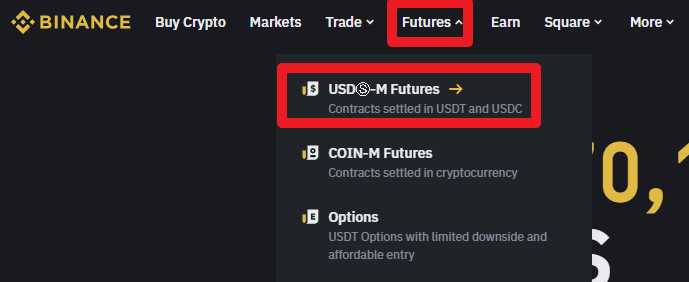
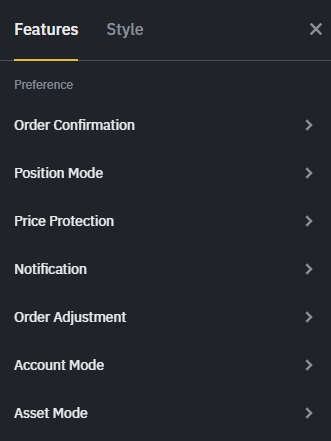
2. Click on the Settings icon on the right side of the Futures trading screen, followed by the Asset Mode button.
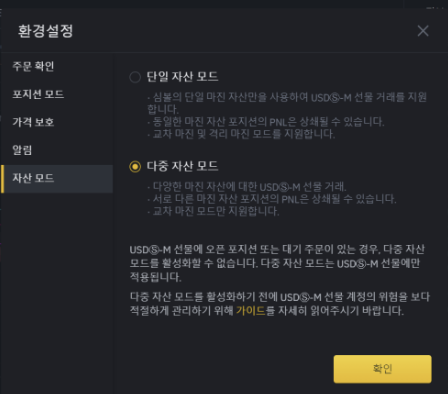
3. When the Asset Mode window appears, select Multi Asset Mode.
Binance Usage Guide
We have gathered all the previously compiled exchange usage guides and Q&A into a roadmap for easy viewing. Please bookmark and use it.
[Check Crypto Exchange Usage Guide]