
Many people are curious about how to set a Stop Loss on Binance. In this article, we will find out what a Binance Stop Loss is and how to set it.
We will also explain TP (Take Profit), which is used alongside it. In addition, we have explained the difference between Stop Loss and Stop Limit.
What is Binance Stop Loss?
Stop Loss means to stop a loss. In other words, it means to prevent losses by placing a reservation sell order when a specific amount of loss occurs.
If utilized well, a Binance Stop Loss(SL) can also be used for taking profit (TP). Therefore, it is good to learn the method.
However, if you are not yet receiving the maximum fee discount on Binance, be sure to check the article below. There is a way to get a free Maker fee and up to a 60% Taker fee discount.
💰 Binance Taker Fee Free, 60% Market Fee Discount MethodBinance Stop Loss Fee
A separate Binance Stop Loss fee is not charged. Therefore, you can consider that only the Market Sell fee is charged.
This is because Stop Loss means that you will sell at the market price when that price is reached, not that you are placing a Limit order.
Because it is a way to prevent larger losses, the risk of the order not being filled due to slippage when placing a Limit order is greater than paying the fee.
Please refer to the articles below for Binance Spot, Margin, and Futures fees.
How to Set Binance Stop Loss
I will explain the Binance Stop Loss setting based on the PC version.
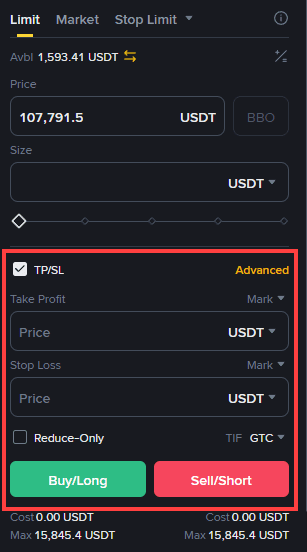
You can enter the desired settlement price in the Stop Loss window on the right side of the Binance trading screen.
When viewing the price entry window, there are two items: Mark and Last.
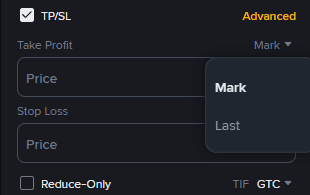
Last means the most recently executed price.
Mark means the price set to prevent unnecessary liquidation. It was created to prevent losses when someone manipulates the coin price, causing a sudden change.
You should set the Stop Loss with the idea that 'I will liquidate my position if it drops to this point.'
For example, if you are trading Bitcoin and the current price is 110,000 USD, and you are willing to withstand up to 105,000 USD, you would place a Stop Loss at 105,000 USD.
Take Profit (TP)
TP also means automatic profit confirmation at the market price. The usage method is the same as Stop Loss, and most exchanges use the same method.
Like Stop Loss, you can write the profit amount you desire. If the current Bitcoin price is 110,000 USD, you would set the TP with the thought that 'If it rises to 120,000 USD, I will take profit at that point.'
Stop Limit?
Stop Limit is a separate trading method from Stop Loss. Please refer to the article below.
Binance Usage Guide
We have gathered all the previously compiled exchange usage guides and Q&A into a roadmap for easy viewing. Please bookmark and use it.
[Check Crypto Exchange Usage Guide]