
Many people are curious about the Binance Hedge Mode. In this article, we will find out what Hedge Mode is and how to take multiple positions on Binance.
What is Hedge Mode?
'Hedge' means a precaution or a fence, and when used in finance, 'hedge' is used as a precaution to prevent risk.
Hedge Mode provided by Binance is a mode that reduces risk through two-way betting on Binance.
If you took a long position because the price seemed likely to rise, but also took a small short position in the opposite direction, the loss will not be as great even if the price drops.
To reduce risk by taking multiple Binance positions like this, you can use Hedge Mode.
Please note that Binance Multi-Asset Modeis an entirely different concept.
Hedge Mode Strategy and Usage Tips
When Taking a Long Position in Futures
If you have entered a long position in futures, but the short-term volatility appears rough, you can temporarily 'lock' the volatility by briefly adding a short position on the same symbol. The idea is to create a temporary neutral state (Delta 0) and then close one side when the direction becomes clear again.
In this way, in a situation where you should have a loss (a negative PnL), the profit from the short position offsets the loss, preserving your capital. If the price returns to the entry point in this state, there is no loss other than the trading fees. If the price rises again, you can aim for the long position to turn profitable again after liquidating the short position at the entry point.
Funding Fee and Basis Carry Strategy
The second is a carry strategy using the funding fee (cost of funding) and basis (the difference between futures and spot prices). If you simultaneously hold a spot long position + a futures short position (or the opposite configuration in COIN-M), profit occurs when the basis normalizes, regardless of market direction.
Especially when funding is skewed to one side for a long period, Hedge Mode allows for fine-tuning, such as creating a two-legged structure to maintain the direction of funding receipt while eliminating exposure to the unfavorable side. This is often used in periods of widening spread when liquidity is thin, such as on weekends or late at night/early morning.
While the losses are not huge, funding fees can accumulate significantly, so the larger the capital size, the more traders use this hedging strategy.
Position Management Before Volatility Events
Of course, it is much better for volatility management to avoid trading before and after events like CPI, FOMC, major listings/unlocks, or major chain upgrades. However, when holding a long-term position, it may be a shame to liquidate the position just because an event is approaching.
In such cases, you can hold small long and short positions simultaneously to insure against sudden gaps.If volatility explodes, you scale up the profitable side and clear the unfavorable side using Reduce-Onlyorders. Especially in volatile environments where stop orders can slip, Hedge Mode buys you time for systematic "response."
That is, in this case, you are not using a 1:1 ratio but rather setting it up with the idea of losing slightly less, or reducing the risk even if you make a profit.
Scaling/Build-up Strategy
Only averaging down in one direction is mentally taxing. With Hedge Mode, it's possible to do mini-market making where you gradually build up a long position while simultaneously realizing profits from short positions on a tick-by-tick basis. You ride the trend with the long position but chip away at the profit with the short position in a sideways market, making average entry price management easier.
Hedge Strategy Tips
Isolated margin mode is easier to manage than Cross margin mode. If you hold positions in both directions, Cross margin mode carries a high risk because if one side experiences a sharp rise or fall, it draws on the margin from the other side.
Does Using Hedge Mode Mean Zero Risk?
No, it doesn't.
First, Hedge Mode does not mean the risk is '0'. There are costs involved, such as fees for taking hedge positions, funding fees, and slippage. If you rely solely on direction neutrality and leave the account untouched for too long, it will be slowly eroded.
Secondly, in the case of high leverage, the market often tilts heavily to one side, causing the stop on the other side to be triggered simultaneously, resulting in unintended unidirectional exposure.
Test the OCO or trigger sequence in advance, and handle emergency situations by dividing them into the sequence of partial liquidation -> closing the remaining balance. 순서로 나눠서 하세요.
Thirdly, you must not confuse the calculation of the total position PnL with the individual position PnLs.
How to Use Binance Hedge Mode
First, before trading in Hedge Mode on Binance, check how to use the exchange with up to a 60% discount for Maker orders and market orders.
💰 Binance Taker Fee Free, 60% Market Fee Discount MethodYou can hedge by taking two Binance positions in the following way:
1. Access the Binance site, log in, and go to the Futures trading window.
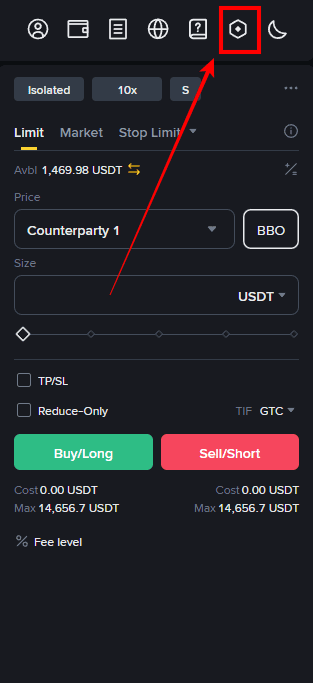
2. Click the icon (Settings) on the top right of the Futures trading screen.
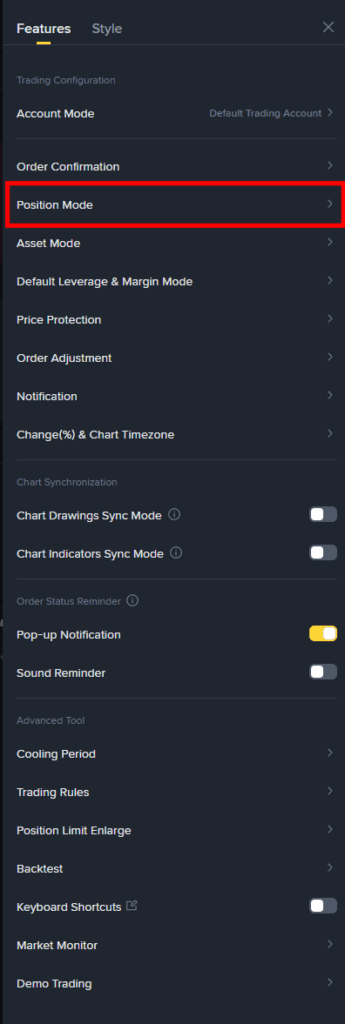
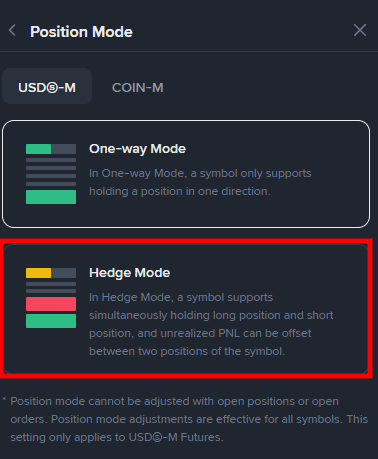
3. Click on Position Mode > Hedge Mode in that order to complete the Hedge Mode setup, allowing you to trade in both directions.
How to Resolve Binance Hedge Mode Not Working
Even if you set up Hedge Mode as described above, there are times when the change is not applied.
This is mostly because you have existing open positions, which prevents the Hedge Mode switch. Therefore, you need to close your existing positions and then switch to Hedge Mode.
Binance Usage Guide
We have gathered all the previously compiled exchange usage guides and Q&A into a roadmap for easy viewing. Please bookmark and use it.
[Check Crypto Exchange Usage Guide]