

Many people are curious about how to get a loan on Binance. In this article, we will find out how to borrow on the Binance exchange and how to use Binance Lending.
💰 Binance Taker Fee Free, 60% Market Fee Discount MethodWho is Eligible for Loans on the Binance Exchange
You can invest a larger amount than what you have by using the Binance Futures or Margin exchange.
Therefore, there is no need to take out a loan if you are doing futures tradingor margin trading.를 하는 경우 대출을 할 필요는 없는데요.
Instead, many people who want to invest a larger amount than what they possess while doing Spot Tradingon Binance utilize the loan feature.
How to Get a Binance Loan
1. Access the Binance site and log in.
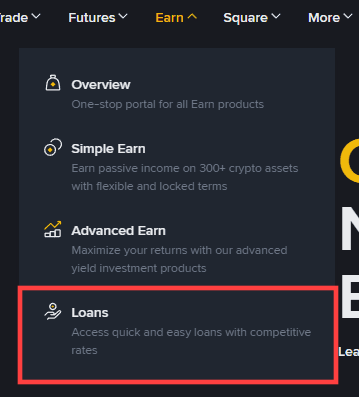
2. Click on Earn > Loans in the top menu.
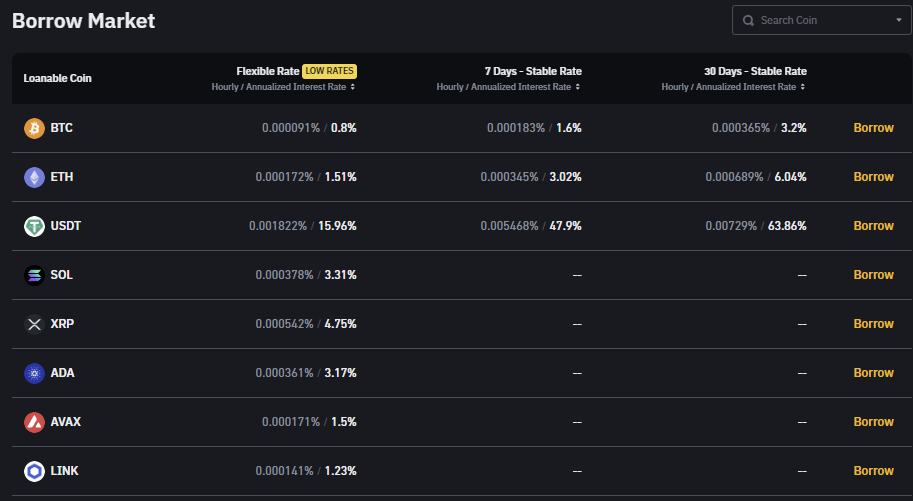
3. Scroll down, and you will see a list of various coins and interest rates: Flexible Rate and Stable Rate. Click the [Borrow] button on the right side of the coin you wish to borrow.
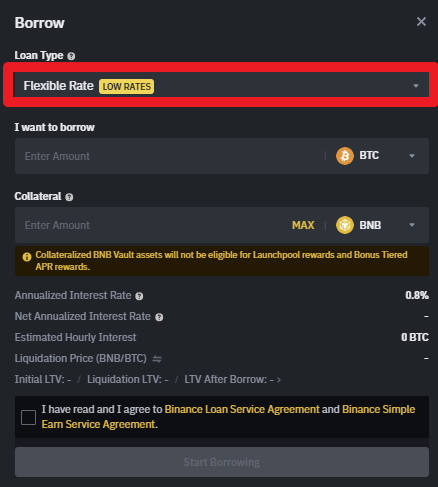
4. When the Borrow window appears, select Stable Rate or Flexible Rate in the Loan Type section.
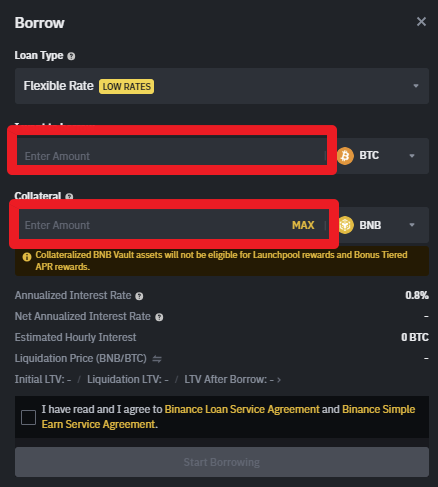
5. Enter the desired borrowing amount in the I want to borrow field, enter the coin to be used as collateral in the Collateral field, and then click the Start Borrowing button. The loan will be completed.
Detailed Explanation
You must specify the amount to borrow, the collateral amount, and the Loan Term. The loan term can be selected from 7 days, 14 days, 30 days, 90 days, or 180 days.
An example is as follows:
You deposit 153.85 USDT as collateral and borrow $100$ USDC, with the LTV (Loan To Value Ratio) set at 65%. This means "you can borrow up to 65% of the collateral value." This structure allows you to borrow up to approximately 650 USD if you put up 1,000 USD as collateral.
If the LTV exceeds 83%, the system performs Forced Liquidation to prevent risk. In other words, the collateral coin is sold at market price to repay the loan, so you must check the LTV periodically.
The interest rate is displayed in terms of the Hourly Interest Rate and Daily Interest Rate, and the longer the loan term, the higher the Total Interest Amount. After checking all conditions, check the 'I agree to the Terms and Conditions' box and press the Confirm button to complete the loan.
After the loan is completed, you can directly adjust the LTV (Adjust LTV) and Repay in the [All Orders] menu.
LTV Adjustment is a feature that allows you to deposit additional collateral or withdraw some collateral to prevent margin calls or forced liquidation. For example, if the market drops sharply, the value of the collateral decreases, so you must add more collateral at that time to lower the LTV.
You can also make an early repayment by clicking the Repay button. The repayment amount can be freely adjusted at the time of repayment, and interest for the remaining period is not calculated upon early repayment.
Binance Usage Guide
We have gathered all the previously compiled exchange usage guides and Q&A into a roadmap for easy viewing. Please bookmark and use it.
[Check Crypto Exchange Usage Guide]