

There are a few reasons why withdrawal restrictions are placed on Binance. In this article, we will find out how to lift Binance withdrawal restrictions in these cases.
Binance Withdrawal Restriction Reasons (Binance Withdrawal Not Working)
Case 1: Identity Verification (KYC) Has Not Been Completed
Basically, withdrawal restrictions are applied if you have not completed the identity verification (KYC) process conducted by Binance.
Since you cannot withdraw an amount exceeding 2 BTC, you must complete identity verification. Please check the method for identity verification below.
Case 2: Attempting to Withdraw an Amount Larger Than the Withdrawal Limit
Even if you have completed basic identity verification, you cannot withdraw a larger amount unless you complete the advanced verification called Verified Plus.
Binance Withdrawal Time Limit
To conclude first, Binance is an exchange without a 24-hour withdrawal restriction, meaning there is no withdrawal time limit.
Conversely, Upbit has a withdrawal restriction time: Withdrawal is not possible for 72 hours after the first deposit, and From the second deposit onward, withdrawal is not possible for 24 hours after the deposit.
In contrast, Binance does not have a 24-hour withdrawal restriction, so you can deposit and withdraw easily. Please refer to the articles below for specific Binance deposit and withdrawal methods.
How to Lift Binance Withdrawal Restrictions
Before finding out how to lift Binance withdrawal restrictions, let's point out one important fact. If you are not yet receiving the maximum trading fee discount (free for Limit orders and up to 60% off for Market orders), please make sure to get this benefit using the article below. 만약 아직까지 거래 수수료를 지정가 무료, 시장가의 경우 최대 60%까지 할인 받고 있지 않았다면 아래 글에서 해당 혜택을 꼭 받으시기 바랍니다.
💰 Binance Taker Fee Free, 60% Market Fee Discount MethodHow to Increase Binance Withdrawal Limit
Binance Basic Identity Verification (Verified) Method
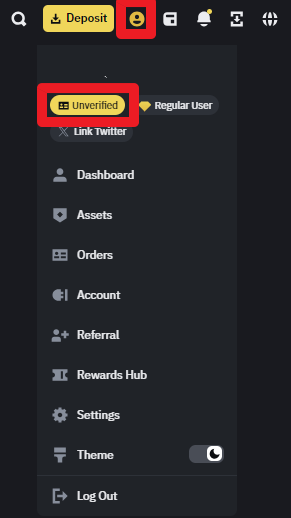
1. Access the Binance website and log in. Click the [person icon] in the upper right corner, and then click [Unverified] in order.
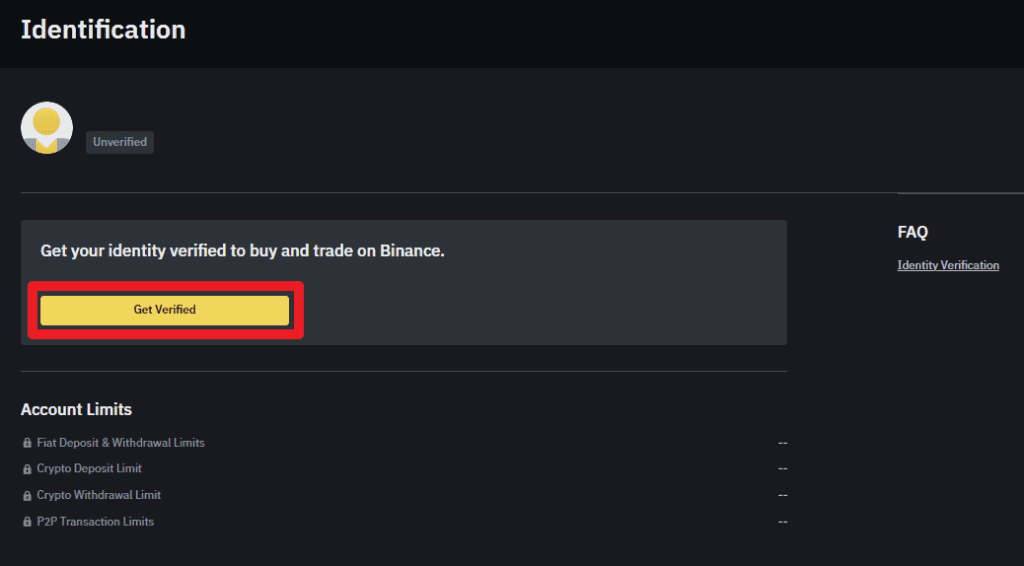
2. Click the [Get Verified] button.
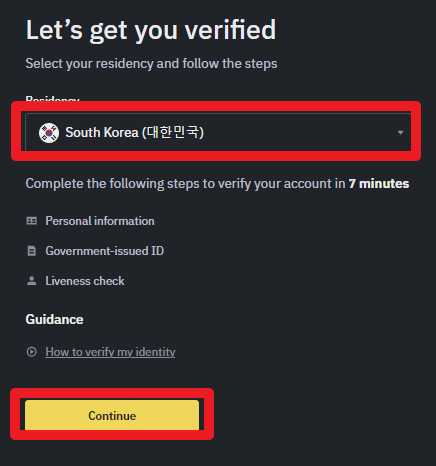
3. Select South Korea for Residency, and then click the [Continue] button.
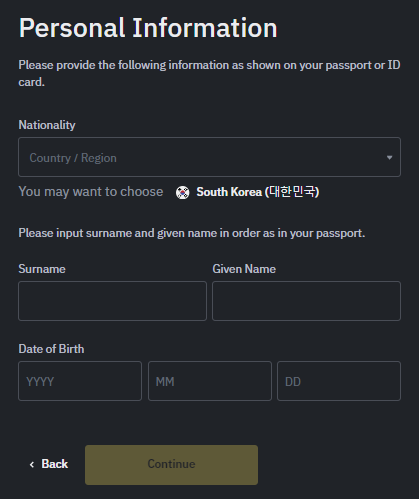
4. In the Nationality window, select South Korea, and you must enter your name and date of birth. You should enter your English name based on your passport.
Enter your passport English Surname in the Surname field, and your passport English Given name in the Given name field.
5. When the address entry window appears, enter your [address].
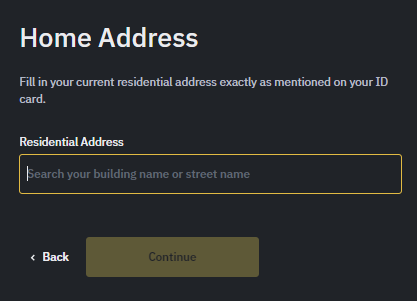
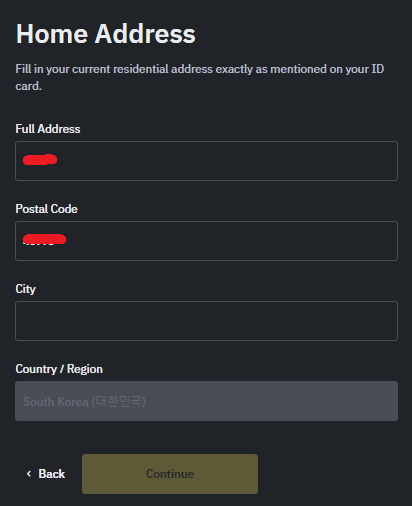
6. Since Full Address and Postal Code are already filled in, enter the 'City' unit of your residence in the City field (e.g., Seoul-si, Busan-si).
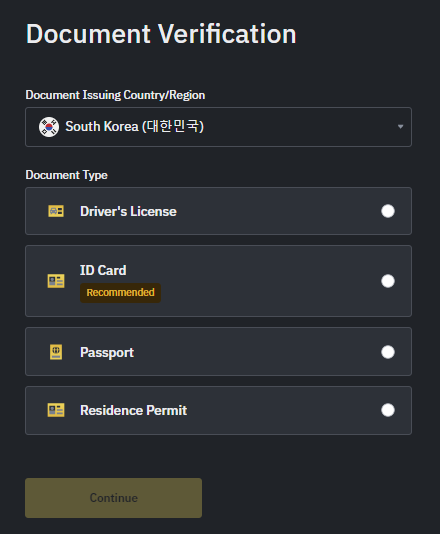
7. Take a picture of one of the following: Driver's license, ID card, Passport, or Residence certificate, and attach the photo to complete identity verification.
Binance Advanced Identity Verification (Verified Plus) Method
Please refer to the article below for the Binance Advanced Identity Verification method.
We have now looked at how to lift Binance withdrawal restrictions. Thank you.
Binance Usage Guide
We have gathered all the previously compiled exchange usage guides and Q&A into a roadmap for easy viewing. Please bookmark and use it.
[Check Crypto Exchange Usage Guide]