
Whether you want to transfer your crypto to another wallet or convert it into local cash (USD, EUR, GBP, etc.), this guide covers everything you need to know about withdrawing from Binance.
Check the article below to find out how to get free Maker fees and 60% off Taker fees on Binance without VIP benefits.
💰 Binance Taker Fee Free, 60% Market Fee Discount MethodHow to Cash Out from Binance
Crypto Withdrawal
Because Binance is a global exchange, you have two main ways to "cash out":
Fiat Withdrawal (Directly to your bank) and Crypto Withdrawal (To another exchange or a private wallet like MetaMask).
Steps for Crypto Withdrawal:
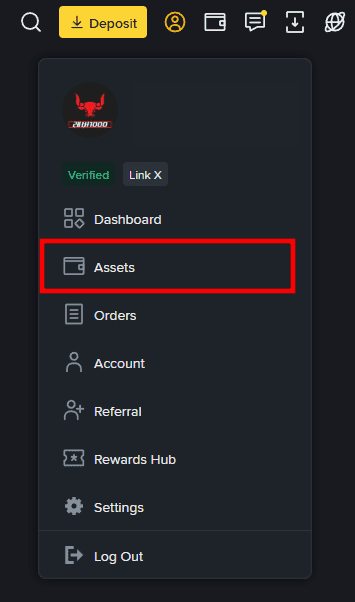
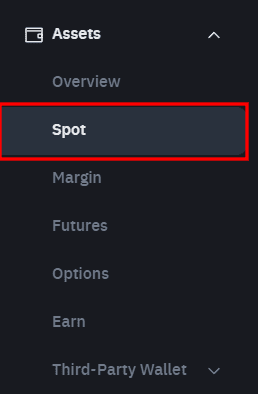
1. Log in to your Binance account. 2. Go to your [Wallet] icon and select [spot]. You can only withdraw assets that are in your Spot wallet.Note: If your funds are in Futures or Earn, use the [Transfer] button to move them to the Spot wallet first.
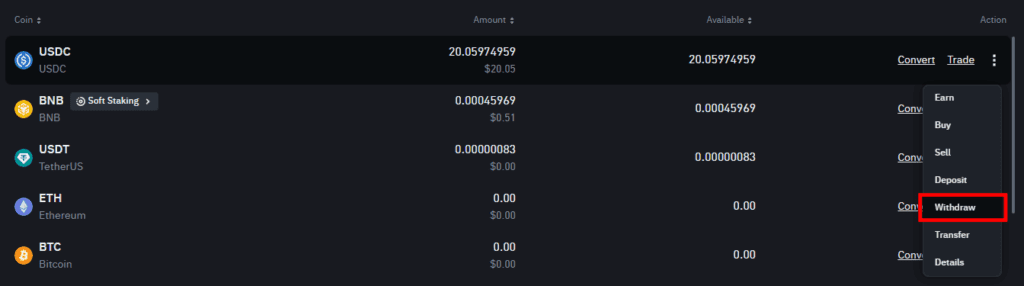
3. Find the coin you wish to withdraw and click [Withdraw].
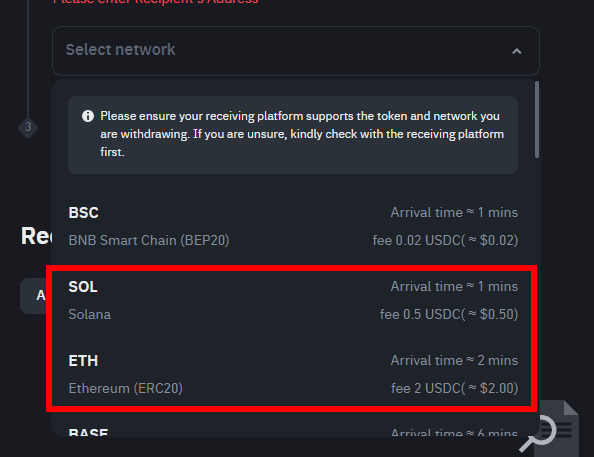
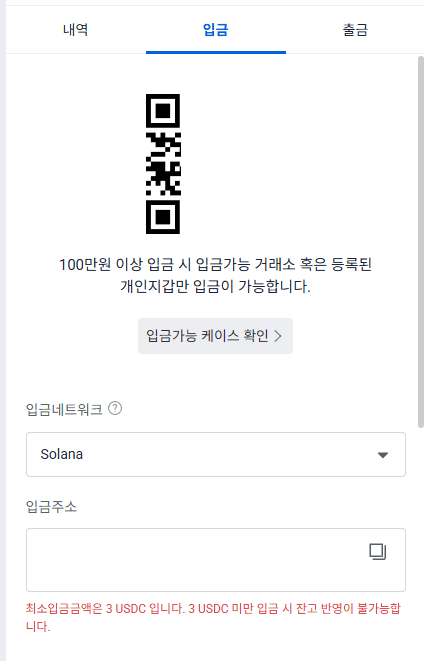
4. Select the Network: This is the most important step. You must choose a network that is supported by both Binance and your receiving wallet.Tip: For USDC/USDT, the Solana (SOL) or BNB Smart Chain (BEP20) networks are usually much cheaper and faster than the Ethereum (ERC20) network.
5. Enter the Address: Paste the deposit address from your receiving wallet (e.g., MetaMask, Ledger, or another exchange).
6. Security Verification: Complete the 2FA (Email, SMS, or Authenticator) to authorize the withdrawal.
-
If you are moving funds to explore other exchanges, we recommend Gate.io. They offer a massive variety of "altcoin gems" and up to an 80% fee rebate for new users.
Check out:
[Gate.io Full Usage Guide & Bonus]Withdrawal Processing Times
The time it takes for your funds to arrive depends on the blockchain network you choose:
Fast (Under 5 mins): Solana (SOL), Ripple (XRP), Tron (TRX), BNB Chain (BEP20).
Moderate (10–30 mins): Ethereum (ERC20), USDC/USDT on ERC20. Slow (30 mins – Several Hours): Bitcoin (BTC). During high network congestion, BTC withdrawals can occasionally take longer.
ecommended Coins for Withdrawal
To minimize fees, we recommend using the following assets for transfers:
Stablecoins (USDT/USDC): Best for maintaining value. Use BEP20 or Solana networks for fees under $1. XRP or TRX: Extremely low fees and high speed, ideal for moving funds between exchanges.
Troubleshooting: Withdrawal Suspended?
If you find that you cannot withdraw your funds, check for the following:
Check the Withdrawal Suspended
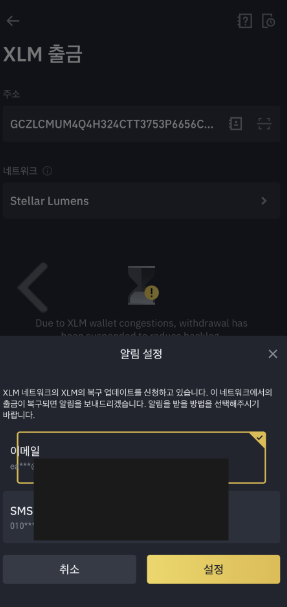
New Security Settings: If you recently changed your password or 2FA, Binance will suspend withdrawals for 24–48 hours for your protection. Wallet Maintenance: Sometimes specific networks are down for maintenance. You can check the status on the [Binance System Status] page. Set Alerts: If a specific coin's withdrawal is suspended, click the [Set Alert] button on the withdrawal page. Binance will notify you via Email or SMS once the service resumes.
How to Set Up Binance Withdrawal Availability Alerts
You can easily check the current status of any coin's withdrawal (active or suspended) on the Binance withdrawal page. If a specific network or coin is currently suspended, follow these steps to be notified immediately when it resumes:
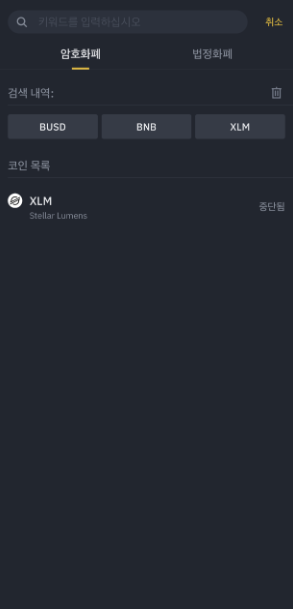
1. Select the Asset: Go to the withdrawal page and select the coin that is currently suspended.
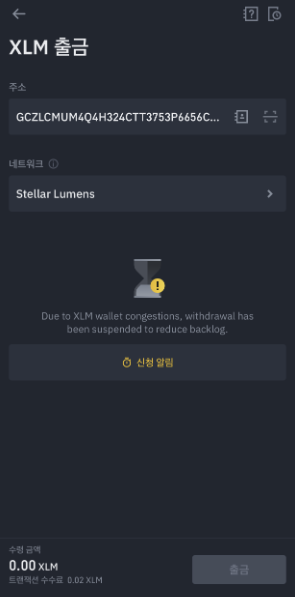
2. Configure Network: Choose the specific address and network you intend to use.3. Click [Set Alert]: You will see a notification button (often labeled as "Set Alert" or "Notify Me") in the middle of the page. 4. Enter Contact Info: Provide your Email address or Mobile number (SMS). 5. Confirm: Click the [Submit] or [Set] button.Once the withdrawal service for that coin or network is restored, Binance will send you an automated alert so you can complete your transaction without having to check back manually.
Binance Usage Guide
We have gathered all the previously compiled exchange usage guides and Q&A into a roadmap for easy viewing. Please bookmark and use it.
[Check Crypto Exchange Usage Guide]