BitGet has launched TradFi with up to 500x leverage, which is the classic way to trade using a trading platform called MetaTrader 5 (MT5), but now you can do things like gold futures, forex, and oil futures on BitGet.
We'll show you how in a moment.
What is BitGet TradFi?
In a nutshell, BitGet is a cryptocurrency exchange. When you want to trade something on BitGet, it's usually against a stablecoin like USDC or USDT.
Furthermore, each exchange has its own listing system, security controls, and monetary restrictions/limitations. The same goes for insurance, which means that in order to make something tradeable, there's a very big constraint that you have to ‘create and list a new product based on a stablecoin like USDT/USDC".
If it's the original coin, it's not a problem, but it has to be liquid, it has to have a lot of volume, and if it has its own security or financial constraints, it's not easy to launch a new product on its own.
But what if you already have a platform to trade on, and it's set up so that you can trade as soon as a few conditions are met?
That's a contract for difference (CFD). It's a form of futures trading, but without the actual underwriting of oil contracts or anything like that, it's just a system that tracks price.
So it's almost like coin futures, because if I'm not buying bitcoin outright, I don't actually own bitcoin, so even if I have a very large position in a futures trade, it's only the money that's moving, not the holder of the bitcoin, right?
Similarly, when you're trading with a CFD system, you're not actually owning gold, or oil, or gas, or forex, or anything else, you're just moving money around, and you're using a very convenient way of using the futures trading system to leverage up to 500x.
Using TradFi
If you haven't signed up for BitGet yet, sign up at the link below to receive a discount on TradFi trading fees.
bitget 20% Payback JoinHow to sign up for BitGet Check the Article.
At the moment, BitGet's TradFi is in beta, not live, so we're only accepting people on a selective basis. However, if you signed up through my referral, I will reach out to the managers and help you get set up so you can start using BitGet TradFi as soon as possible.
Get BitGet Tradfi Now Contact UsGo to BitGet Tradfiall tiers.
Click Try now.

They will then email you when it's done, but this is a select group of people, so it's difficult for many people. If you are registered as my referral, please send me your UID via Telegram and I will help you get approved quickly.
How to use BitGet TradFi
Then wait for authorization and you will see the Create account as shown in the photo below.
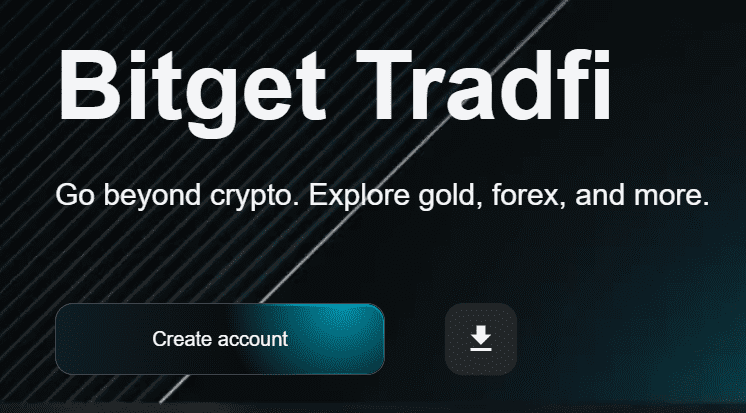
Click here to create an account. The screen for creating an account on mobile is shown below.
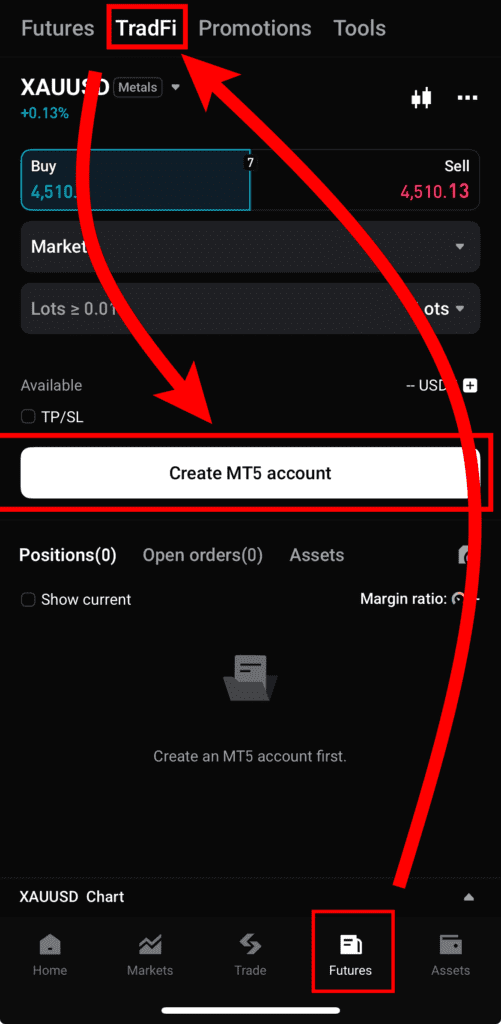
From the home screen, click Futures -> click TradFi at the top -> click Create MT5 account in the middle.
Create a Bitget MT5 Account
We'll show you how to create an account on mobile, but the process is similar on PC, so you can follow along!
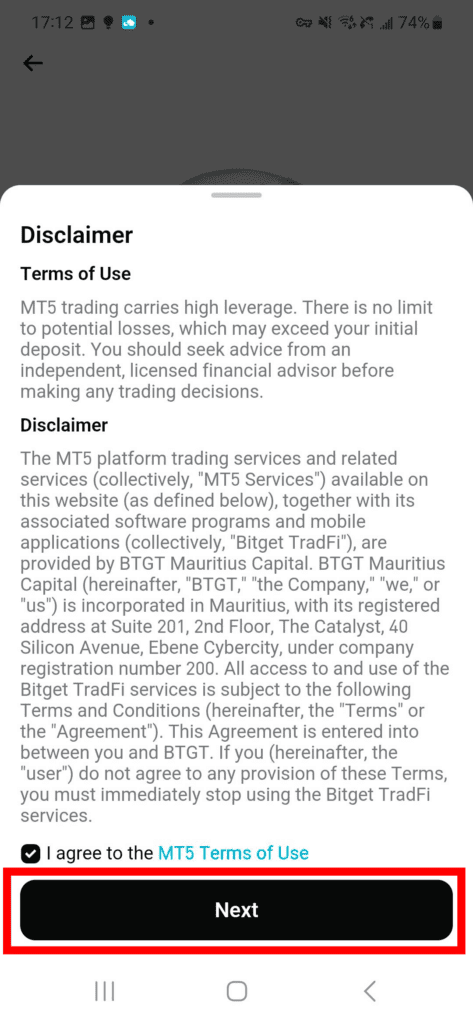
Click the checkbox and click Next.
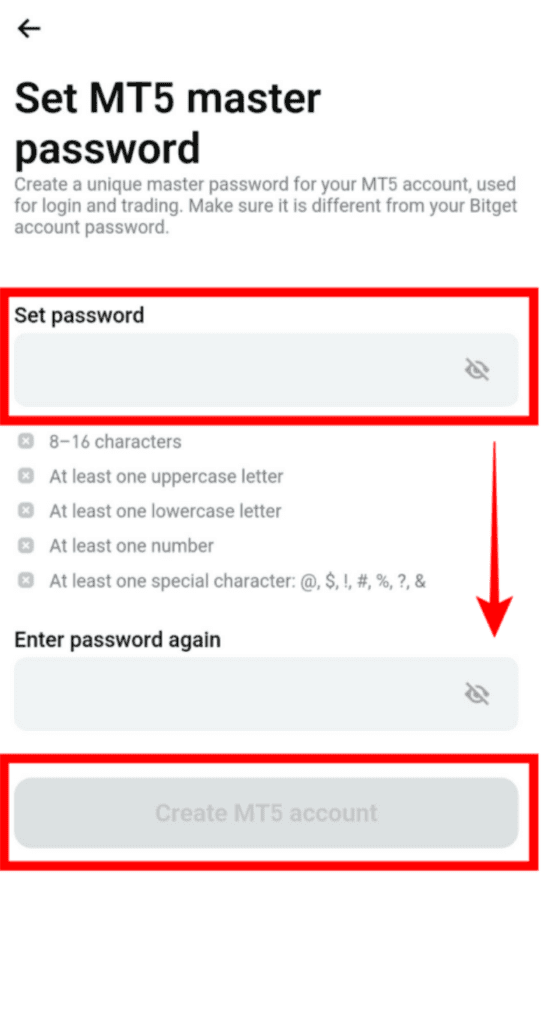
You will need to set a password, which is separate from your BitGet password. This is your MT5 password, so make sure you remember it.
The condition must contain 8 to 16 characters, uppercase English, lowercase English, numbers, and special characters: @ # $ ! % & ? No other special characters are allowed.
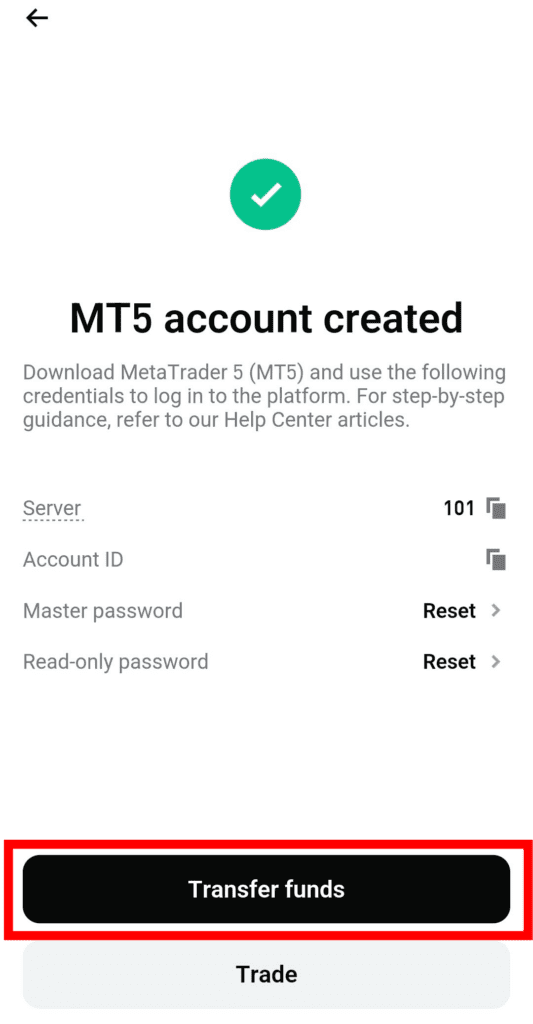
Enter your password and you're done creating your MT5 account. Click Transfer funds.
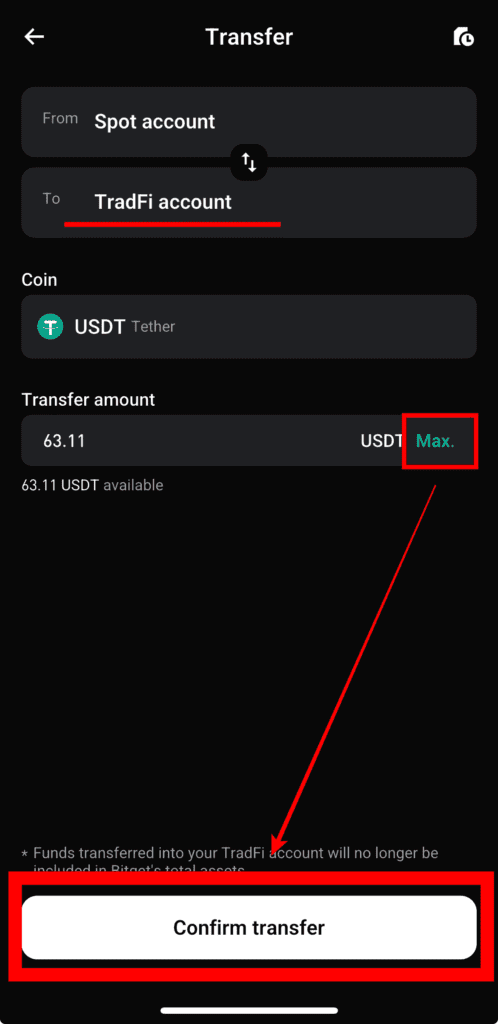
Leave To as your TradFi account, click Max, and then click Confirm transfer.
Increase leverage to 500x - Address Verification
If you follow the above steps, you can trade, but your leverage will only be 100x instead of 500x. This is due to legal risks around the world, so you will need to get local authorization to open up the leverage to 500x.
On the TradFi trading screen, click the warning at the top.
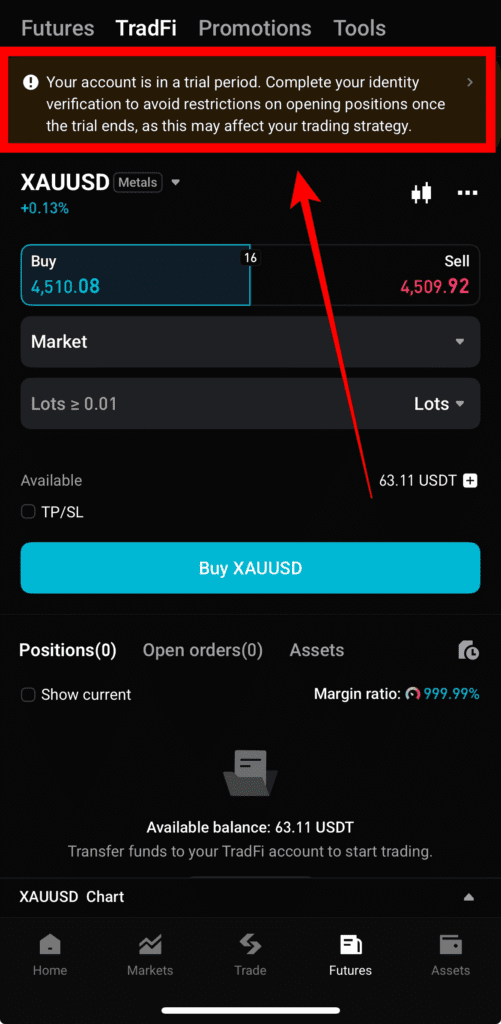
You'll see a screen like the one below, and then click Confirm.
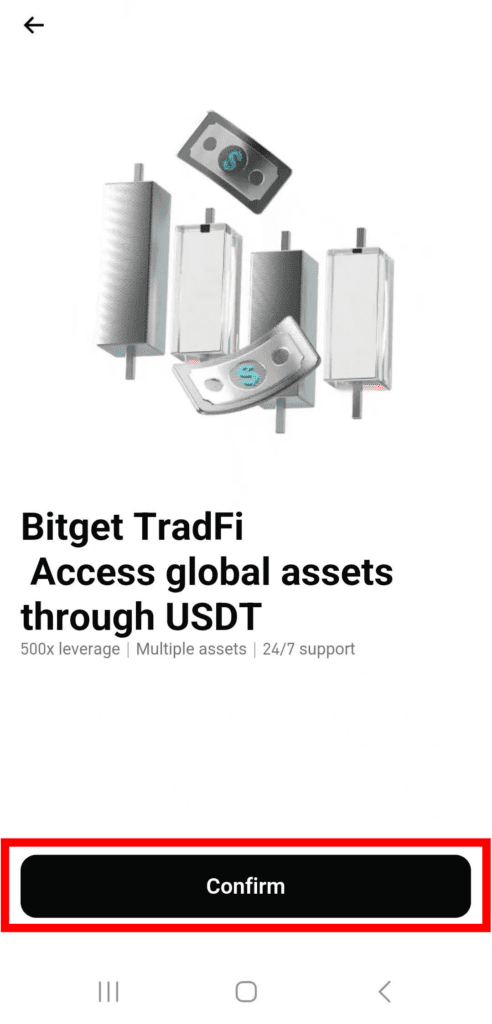
Normally, unless you're creating a new account, you'll have already verified your identity and will only need to complete Proof of Address.
Click Verify Now.
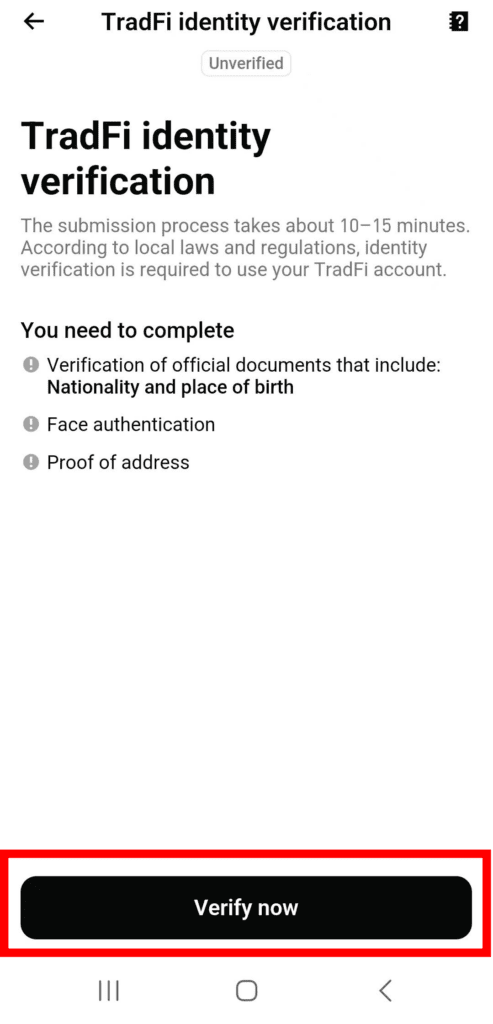
To verify your region, you can submit a utility bill, such as water or electricity, or a national pension, health insurance, or carrier bill.
Take a picture, upload it, and you're done.
How to Trade BitGet TradFi
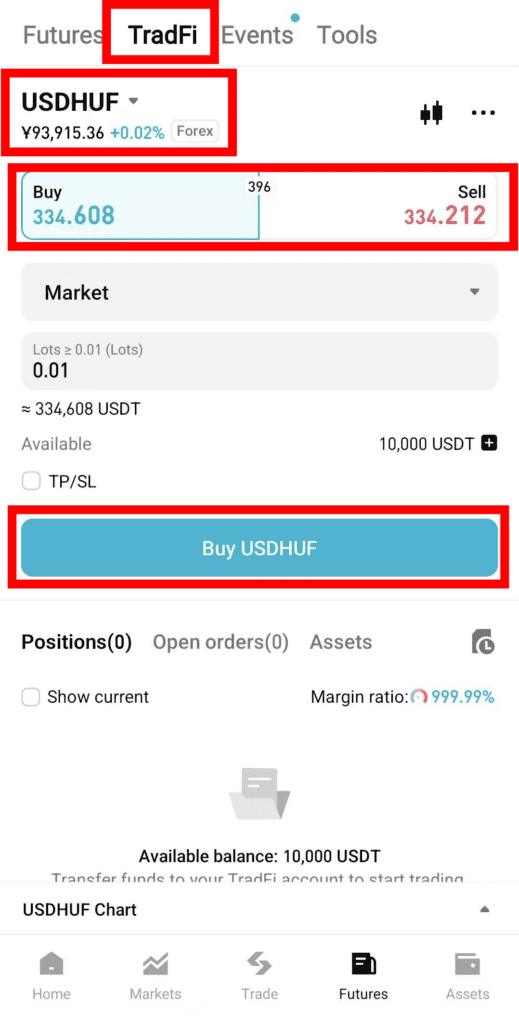
When you enter, you'll see a screen like the one above, but the first thing to look for is the USDHUF symbol at the top, which is the symbol you'll be trading, just like with Bitcoin.
We'll summarize the stocks that are currently available for trading below.
The second is Buy / Sell, which uses leverage that is already fixed, so you'll need to check how much leverage you have on each instrument.
Below that, Market is the market price setting. You can also set a limit price, but other trading options are not yet implemented in the BitGet app.
Lot shows the number of contracts to trade. The amount of 1 contract varies depending on the instrument, so after writing down the number of lots, you should check the USDT amount shown below to see how much you're taking a position.
The minimum lot size can be as low as 0.1. Finally, long positions can be traded on the Buy tab, while short positions can be traded on the Sell tab.
Checking information after a transaction ends

Once the trade is finalized, you can see in Completed, as shown in the photo above, whether you are long (Buy), how many lots, how many contracts, how much your total profit (= including transaction fees and overnight) was (Total PnL), how much your order profit (profit from the trade alone) was (Order PnL), transaction fee, swap fee, how much you entered, when you entered, and when you exited.
Available for trading
Forex covers almost all major and minor pairs, as well as most of the more advanced ones you might encounter.
Some of the most frequently traded pairs include EURUSD (Eurodollar), USDJPY (Dollar Yen), and GBPUSD (Pound Sterling). These are the most frequently traded pairs and make up the majority of the global forex market.
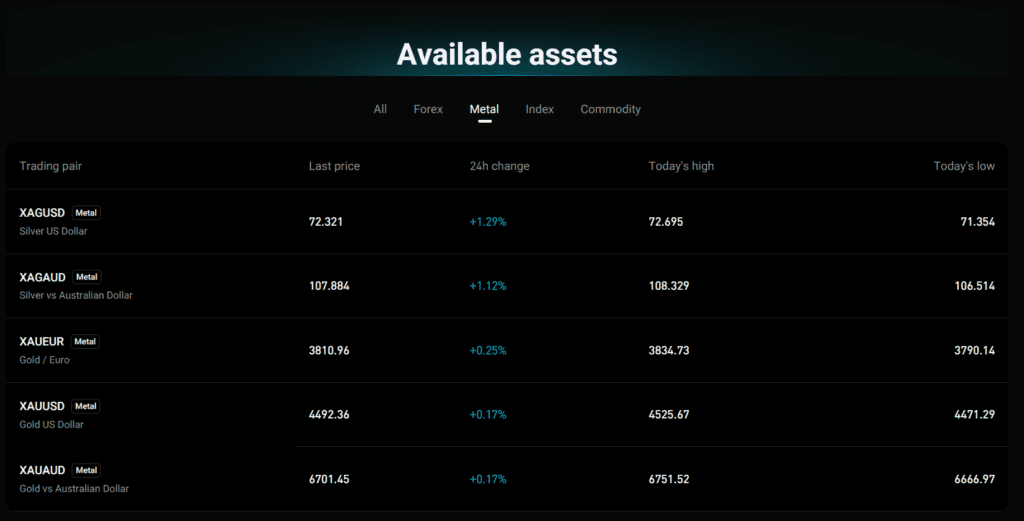
Metals are available for trading as Silver Dollar / Silver Aussie / Gold Euro / Gold Dollar / Gold Aussie as shown below.
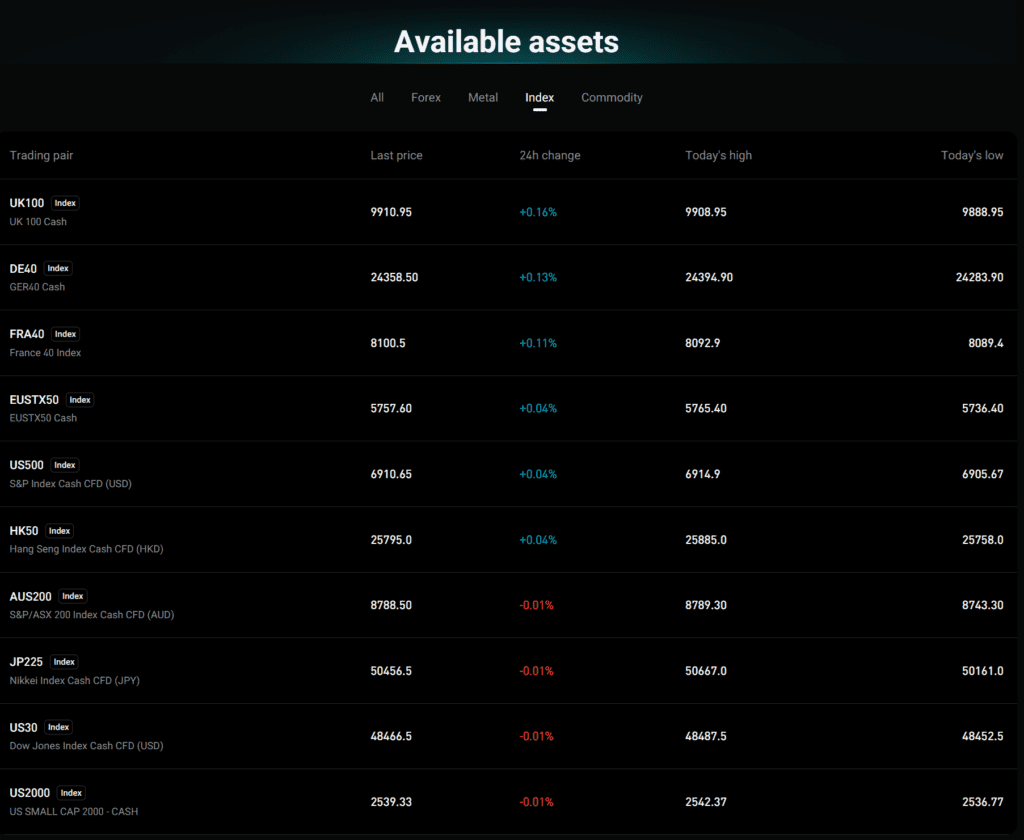
An index is an index. You can trade indices like the UK 100, SNP500, or Nikkei 225. The names are slightly different from what you're used to seeing on brokerages, so you'll want to make sure that the index amount and the index you want to trade are in the same range, especially since they're not exactly the same amount as what you see on the brokerage.
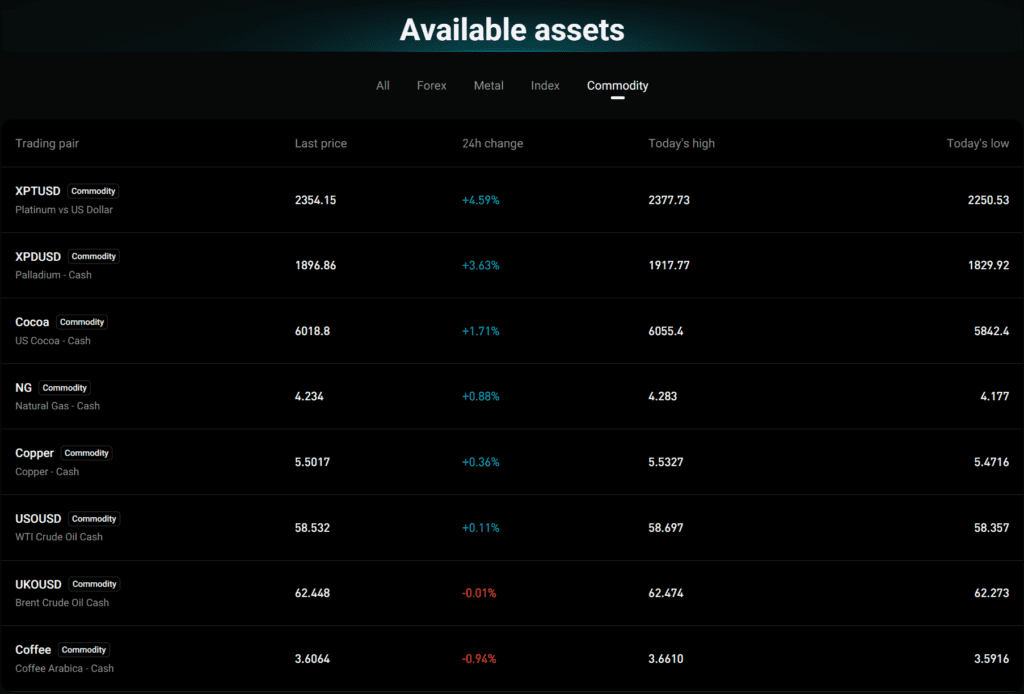
A commodity is a raw material. You can trade platinum, cocoa, gas, WTI crude oil, Brent oil, coffee, and more.
How to trade on a PC
For now, you'll need to download MT5 to trade on your PC, but we're working on making it possible to trade on the website in the future, so we'll keep you updated when that happens.
You will need to download it for your PC OS from the link above and then turn on MT5 and enter your server.
After logging in to BitGet and entering the TradFi screen, you will see your MT5 ID and Server.
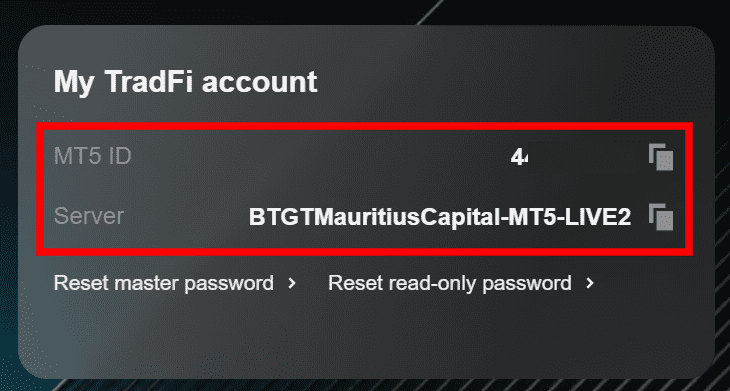
Copy this to your downloaded MT5 and log in to Mt5. Please note that all servers and usernames are different, so make sure to check them before logging in.
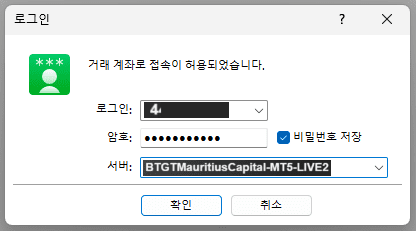
Now you can trade with the money you transferred from BitGet.
BitGet TradFi Fees
| Gift types | Proof of leverage | Transaction fees for VIP2 and below | Transaction fees for VIP3 and above users |
| Foreign exchange (Forex), indices (US500, NAS100, JP225, etc.), commodities like gold/silver/crude oil, individual stocks in the US/Europe/Korea, and virtual assets (BTC, ETH, etc.) can all be traded as CFDs in one account. | Up to 500:1 | $6 per lot | $5.4 per lot |
| Precious metals | Up to 500:1 | $6 per lot | $5.4 per lot |
| Commodities | 20:1 | $3 per lot | $2.7 per lot |
| Crude Oil (Oil) | Up to 500:1 | $3 per lot | $2.7 per lot |
| Nikkei225 | Up to 500:1 | $0.1 per lot | $0.09 per lot |
| HK50 | Up to 500:1 | $1.5 per lot | $1.35 per lot |
| HKTECH | Up to 500:1 | $0.5 per lot | $0.45 per lot |
| Other gifts | Up to 500:1 | $3 per lot | $2.7 per lot |
When you open a position in MT5, the system checks that you have enough funds to cover the required margin, excluding trading fees. However, trading fees are deducted directly from your account balance, so you must ensure that you have enough funds to cover the fees, otherwise your position may be closed as soon as it is opened.
Calculating transaction fees
Trading fees for forex, metals, commodities, crude oil, and indices are calculated as follows Fee = Futures Volume (lots) × Fee per lot
Fee charging and display logic
Trading fees are charged immediately when you open a position from your MT5 account balance.
Swap fees
Certain categories of futures trades incur swap fees (also known as “rollover” or “overnight interest”).
Technically, the swap fee is similar to the funding fee when trading coin futures, except that the swap fee is charged every 24 hours and the funding fee is charged every 8 hours.
On BitGet, swaps for forex, precious metals, crude oil, and commodities are charged in points, while index swaps are charged in money. Calculating swap fees can be a bit complicated.
Swap fees are charged when you hold a position past 00:00 server time (usually UTC+3, UTC+2 during daylight saving time).
There are two types of calculation methods used within BitGet MT5.
Amount method (index)
Formula = Swap × Lot size × Days held Example: HK50 swap calculation If a user buys (long) 1 lot of HK50 and holds the position for 2 days.
Long swap: -7.2 Sell (Short) swap: +3 Calculation = -7.2 × 2 × 1 = -14.4 USD
Point method (commodities, forex, metals, crude oil)
Formula: Lot Size × Units × Minimum Digits × Swap Rate × Days Held
Example
Calculating a swap for Gold Assume you have a long position and the swap rate for your short position is -50.
A trader holds two positions of 1 lot each, for a total lot size of 2.
Futures specifications: Using gold as an example, 1 lot = 100 units, and the minimum price change (minimum number of digits) for a futures contract is 0.01.
Total lot size: The user has two positions of 1 lot each, so the total lot size is 2.
Apply the formula: Lot Size × Units × Minimum Digits × Swap Rate × Days Held
In this case: Lot size = 2 Units = 100 Minimum digits = 0.01 Holding days = 1 Swap fee = -50 (short) Swap calculation: 2 × 100 × 0.01 × (-50) × 1 = -100
That is, -100 points.
Market Watch and Swap Rates
Within the Market watch window, right-click on the futures contract and select Specification. Scroll down to see the specific rates for Swap Long and Swap Short for each position.
Also, in certain cases, a 3-day swap fee may apply.
What is a 3-day swap?
Financial markets (forex, commodities, indices, etc.) are typically closed on weekends. However, interest is still settled for these non-trading days.
“The term ”three-day swap" refers to the interest or funding fee applied to positions held overnight over the weekend. This fee is usually tripled to reflect the interest accumulated when the market is closed.
To compensate for interest losses that may occur over the weekend, BitGet applies 3 days worth of swap fees on Wednesday. This ensures that the interest cost of holding a position during this period is covered.
For this reason, you'll pay a higher fee to hold a position on Wednesday at 11:00 UTC (12:00 GMT). Because of this fee, slightly more positions are liquidated just before Wednesday.
How it works
- 일일 스왑 레이트: 보통 스왑 레이트(포지션을 하룻밤 보유하는 비용)는 각 거래일이 끝날 때 적용됩니다.
- 3일 스왑 적용: 특정 요일(보통 수요일)에는 시장이 닫히는 이틀(토요일 및 일요일)의 이자를 포함하기 위해 스왑 레이트에 3을 곱합니다.
- 수요일 부과: 이 관행은 많은 금융 시장에서 표준인 T+2 결제 관행(거래일 플러스 2일)과 일치합니다. 수요일에 실행된 거래는 일반적으로 금요일에 결제되므로, 이 시점을 지나 보유한 포지션은 주말 스왑이 발생하게 됩니다.
Example
외환 거래 EURUSD 매수 포지션을 보유하고 있으며 일일 스왑 레이트가 -0.1 포인트라고 가정해 보겠습니다.
- Daily Swap: -0.1 points
- 3-day swap (effective Wednesday): -0.1 points × 3 = -0.3 points If you hold a position from Wednesday to Thursday, the swap fee for that night will be -0.3 points instead of the usual -0.1 points.
상품 및 귀금속 외환과 마찬가지로 금(XAUUSD) 포지션을 밤새 보유하는 경우, 수요일의 3일 스왑에 주말분이 포함됩니다.
- Daily swap rate: Assume the rate for gold is -0.2 points.
- 3-day swap (effective Wednesday): -0.2 points × 3 = -0.6 points
지수 S&P500과 같은 지수의 경우도 과정은 동일합니다.
- Daily swap rate: Assume the rate is -0.05 points.
- 3-day swap (effective Friday): -0.05 points × 3 = -0.15 points.
Comprehensive Guide to Crypto Exchange Usage
We have gathered all the previously compiled exchange usage guides and Q&A into a roadmap for easy viewing. Please bookmark and use it.
[Check Crypto Exchange Usage Guide]